My 2D Game Engine

This is a personal work: a simple 2D game engine in C++, written for a game engine course. It includes a game loop with start-up and shutdown, math (Vector/Matrix 2/3/4), a custom smart pointer, a world, a game object factory, a job system, and render, physics and collision systems.
Code: My2DGameEngine on GitHub (C++, Visual Studio solution, Windows only). Everything under Engine/ is mine. GLib/ is the small library that came with the course: it owns the Win32 window, the message pump, the Direct3D 11 device and the sprite batch, and the DDS texture loader inside it is Microsoft’s. The JSON parser is nlohmann/json.
The solution still builds unmodified with the v142 toolset, so the pictures below are from a fresh build of the repository rather than from an old capture.
Contents
Architecture
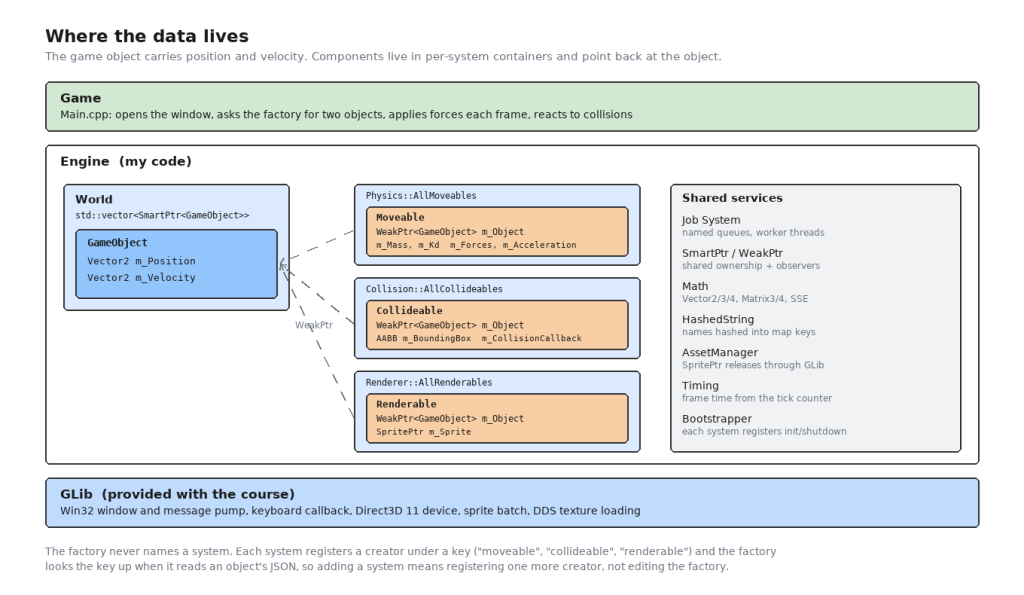
The framework design of the engine is component-oriented. Lightweight game objects only contain the information needed to represent an entity in the world. The components a game object needs – moveable, renderable and collideable – are not owned by the game object. They hold a pointer back to the object they belong to and are maintained in containers. They contain the data needed for their features. All systems implement the logic of their features, and they process the data of the components they are concerned about.
I used to call this ECS. Strictly it is not: in an ECS the entity carries no data at all and the systems iterate over plain component arrays. Here the game object still stores its own position and velocity, and each system walks its own container of components that point back at objects. What it does borrow is the part that matters at this size – the data belonging to a feature lives with that feature, not on the entity, and a system never has to know about a feature it does not own.
Game loop, start-up and shutdown
This system provides a basic framework for the game:
- a main game loop to update all subsystems, by calling their Ticks;
- frame time, from the timing module;
- a Bootstrapper for calling the initializations and cleanups of all the subsystems.
The loop itself is short. Engine::Run() takes the game’s own update as a callback, so the game does not own the loop and the engine does not know what the game does:
void Run(std::function<bool()> i_Update)
{
    bool bDone = false;

    do
    {
        GLib::Service(bDone);
        if (!bDone)
        {
            float dt = GetFrameTime();
            Physics::Tick(dt);
            Collision::Tick(dt);

            if (i_Update());
            else break;

            Renderer::SetClearColor(DirectX::Colors::Blue);

            Renderer::Tick(dt);
        }
    } while (bDone == false);
}
GetFrameTime() measures the gap between two frames with the timing module’s tick counter. The first frame has no previous tick to measure against, so it is assumed to be a sixtieth of a second.
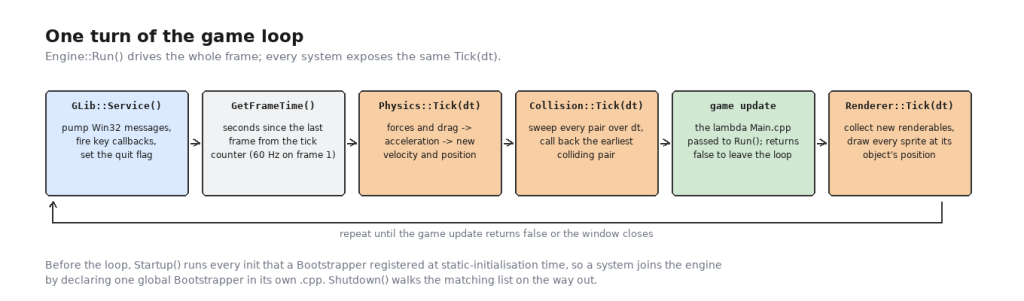
Start-up and shutdown are handled without a central list of subsystems. Bootstrapper is a class whose constructor pushes an init function and a shutdown function onto two global vectors, and every system declares one global instance of it at the bottom of its own .cpp:
// Physics.cpp
Bootstrapper PhysicsBootstrapper(std::bind(Init), std::bind(Shutdown));
Those constructors run before main, so by the time Engine::Startup() is called the lists are already complete. Adding a system to the engine means adding one line to that system’s own file – nothing in the engine’s core has to learn its name.
Math
This module provides basic math types and operations, such as vectors and matrices and their operations, as well as some commonly used operations – whether two floats are equal, degree/radian conversion, and so on. There are Vector2, Vector3 and Vector4, Matrix3 for 2D affine transforms and Matrix4 for the general case, and three different float comparisons (a fixed epsilon, a relative one, and one that compares the number of representable values between the two – fast, balanced and sure).
Some operations are accelerated using SIMD, such as using SSE intrinsics for the inverse and the multiplication of Matrix4. Matrix3 comes in row-vector and column-vector flavours (CreateTranslationRV and CreateTranslationCV, and so on), because which one is correct depends on which side of the multiplication the vector goes; keeping both spellings in the API is what stopped me transposing things by accident later.
Custom smart pointer
We need a mechanism to manage shared data – a game object may be referenced or maintained by several components and systems – so that it is properly released when it is no longer in use and no stale pointers are left behind. So I wrote two:
- SmartPtr, like
std::shared_ptr. All smart pointers to the same data share a reference count. When a new smart pointer gains ownership of the data the count goes up by one, in the copy constructor or the assignment operator; when a smart pointer goes away, destructed or out of scope, the count goes down by one. At zero the resource is released. - WeakPtr, like
std::weak_ptr. Where a smart pointer has shared ownership of the underlying object, a weak pointer is a user or an observer. Weak pointers do not affect the reference count of the smart pointers, and do not affect when the resource is released.
Both counts live in one small block allocated with the first smart pointer, which is what lets the two lifetimes come apart: the object dies when the last owner goes, and the counter block itself survives until the last observer goes too.
void ReleaseOwnership()
{
    if (pCounters)
    {
        if (pCounters->DecSmartRefs() == 0)
        {
            DestroyT::release(pPtr);
            pPtr = nullptr;

            if (pCounters->WeakRefs() == 0)
            {
                delete pCounters;
                pCounters = nullptr;
            }
        }
    }
}
DestroyT is a policy parameter, so a smart pointer can release something that is not deleted with delete. The renderer uses that for sprites, which have to go back to GLib:
class ReleaseSprite
{
public:
    static void release(GLib::Sprite* i_ptr) { GLib::Release(i_ptr); }
};

typedef SmartPtr<GLib::Sprite, ReleaseSprite> SpritePtr;
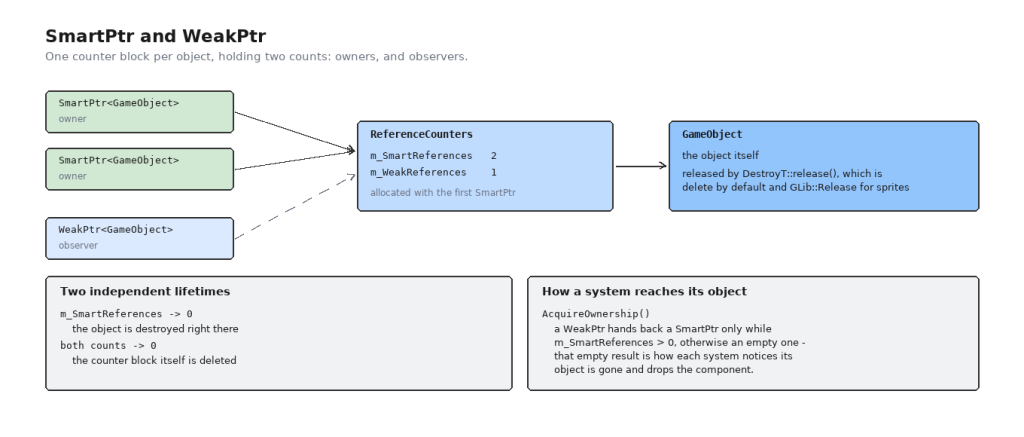
The weak side is what the systems actually use. A component holds a WeakPtr<GameObject> and calls AcquireOwnership() when it needs the object; that returns an empty smart pointer once the object is gone, and an empty result is precisely how each system learns that its component is now pointing at nothing and can be dropped.
Job system
Loading a file should not stop the frame, so the engine has a job system: a queue that any thread can push a piece of work onto, and a fixed set of worker threads that pull from it.
A queue is created by name and given its runners up front. The default queue is made at start-up with two:
void Init()
{
    CreateQueue(GetDefaultQueueName(), 2);
}

Bootstrapper JobSystemBootstrapper(std::bind(Init), std::bind(RequestShutdown));
RunJob() wraps a name, a std::function<void()> and the queue’s name into a QueuedJob and pushes it. The queue is guarded by a critical section, and idle runners wait on a condition variable rather than spinning:
QueuedJob* SharedJobQueue::GetWhenAvailable()
{
    EnterCriticalSection(&m_QueueAccess);

    if (m_Jobs.empty() && (m_bShutdownRequested == false))
    {
        SleepConditionVariableCS(&m_WakeAndCheck, &m_QueueAccess, INFINITE);

        if (m_bShutdownRequested == true)
        {
            LeaveCriticalSection(&m_QueueAccess);
            return nullptr;
        }
    }

    QueuedJob* pJob = nullptr;

    if (!m_Jobs.empty())
    {
        pJob = m_Jobs.front();
        m_Jobs.pop();
    }

    LeaveCriticalSection(&m_QueueAccess);

    return pJob;
}
Add() wakes exactly one sleeper, so pushing one job does not wake every runner to fight over it.
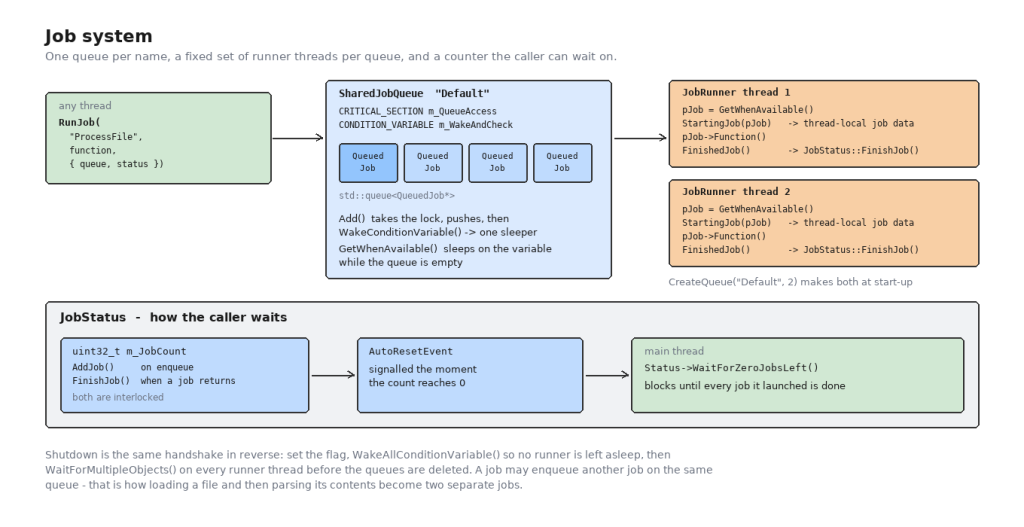
The caller usually needs to know when a batch of jobs is finished, and that is what JobStatus is for. It is a count that goes up as jobs are queued and down as they return, plus an event that fires the moment it reaches zero:
uint32_t FinishJob()
{
    uint32_t NewJobCount = AtomicDecrement(m_JobCount);
    if (NewJobCount == 0)
        m_JobsFinishedEvent.Signal();

    return NewJobCount;
}
The demo passes one JobStatus to both of its object-creation calls and then blocks on WaitForZeroJobsLeft() before entering the game loop, which is the simplest possible loading screen.
Shutdown is the same handshake in reverse. RequestShutdown() sets the flag on every queue and calls WakeAllConditionVariable() – otherwise a runner asleep on an empty queue would never wake up to notice – then waits on all the runner threads with WaitForMultipleObjects() before anything is deleted.
A job may queue another job, and the file loader uses that. ProcessFileAsync() is two jobs, not one: the first reads the bytes off disk, and when it has them it queues a second one to do something with them. The read and the parse are separate pieces of work, so a long parse does not hold a runner that could be reading the next file.
Game object and factory
A game object is deliberately thin – a position, a velocity, and a private constructor so that it can only be created through GameObject::Create(), which hands back a SmartPtr.
Objects are described by data rather than by code. This is GoodGuy.json, the whole thing:
{
  "name": "GoodGuy",
  "initial_position": [ 0.0, 0.0 ],

  "components": {
    "moveable": {
      "mass": 0.1,
      "kd": 0.5
    },
    "collideable": {
      "offset": [ 0.0, 82.0 ],
      "extents": [ 44.0, 82.0 ]
    },
    "renderable": {
      "sprite_texture": "data/GoodGuy.dds"
    }
  }
}
The factory does not know what a “moveable” is. Each system registers a creator function under a key when it starts up:
// Physics.cpp
RegisterComponentCreator("moveable", std::bind(AddMoveable, _1, _2));
and the factory just walks the object’s components block and looks each key up:
for (json::iterator it = i_JSONData["components"].begin(); it != i_JSONData["components"].end(); ++it)
{
    const std::string& ComponentName = it.key();

    auto ComponentCreator = ComponentCreators.find(ComponentName);
    if (ComponentCreator != ComponentCreators.end())
    {
        ComponentCreator->second(NewGameObject, it.value());
    }
}
An unknown key is skipped rather than being an error, which means a data file can carry a component for a system that is not compiled in. Adding a system is one more RegisterComponentCreator() call in that system’s own Init(); the factory never changes.
There are two ways in. CreateGameObject() reads the file and builds the object on the calling thread. CreateGameObjectAsync() hands the whole thing to the job system and calls back when the object exists:
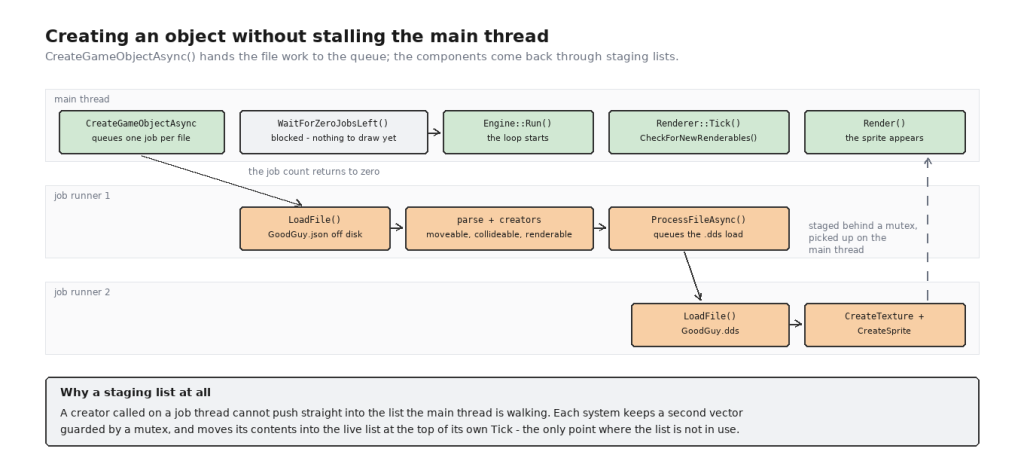
That is where the staging lists come from. A creator running on a job thread cannot push into the vector the main thread is walking, so each system keeps a second vector behind a mutex and moves its contents into the live list at the top of its own Tick(), which is the one moment the live list is guaranteed not to be in use.
Render system
A Renderable is a weak pointer to a game object plus a sprite. The system holds all of them and, once a frame, draws each sprite at its object’s current position:
for (size_t i = 0; i < count; )
{
    SmartPtr<GameObject> Object = AllRenderables[i]->m_Object.AcquireOwnership();

    if (Object)
    {
        if (AllRenderables[i]->m_Sprite)
        {
            Vector2 ObjectPosition = Object->GetPosition();

            GLib::Render(*(AllRenderables[i]->m_Sprite), { ObjectPosition.x(), ObjectPosition.y() });
        }
        ++i;
    }
    else
    {
        if (i < (count - 1))
            AllRenderables[i] = std::move(AllRenderables.back());

        AllRenderables.pop_back();
        --count;
    }
}
That else branch is the whole lifetime story in one place: the object is gone, so the renderable follows it, and removal is a swap with the last element and a pop_back() rather than an erase from the middle. The physics and collision systems drop their dead components the same way.
Sprites are built from the texture’s own dimensions, with the origin at the bottom centre:
GLib::GetDimensions(*pTexture, width, height, depth);

GLib::SpriteEdges Edges = { -float(width / 2.0f), float(height), float(width / 2.0f), 0.0f };
which is why the collideable in the data file carries an offset as well as its extents – the bounding box has to be lifted off the object’s feet to sit on the sprite.
Texture loading is where the render system meets the job system. CreateRenderable() does not load anything itself; it calls ProcessFileAsync() for the .dds and returns. When the bytes arrive, a job creates the texture and the sprite and pushes the finished renderable into the staging list. Whether that push goes into the live list or the staging one is decided by asking which thread is running:
if (InMainThread())
{
    AllRenderables.push_back(NewRenderable);
}
else
{
    ScopeLock Lock(NewRenderablesMutex);
    NewRenderables.push_back(NewRenderable);
}
Physics system
A Moveable carries a mass, a drag coefficient kd, and the force currently being applied to it. Every tick the system turns those into a new velocity and a new position:
const Vector2 CurrentVelocity = Object->GetVelocity();

const Vector2 Drag = CurrentVelocity * -(AllMoveables[i]->m_Kd);
const Vector2 TotalForce = AllMoveables[i]->m_Forces + Drag;

const Vector2 Acceleration = TotalForce / AllMoveables[i]->m_Mass;

const Vector2 NextVelocity = CurrentVelocity + (Acceleration * i_dt);
const Vector2 AverageVelocity = (CurrentVelocity + NextVelocity) / 2.0f;

Object->SetPosition(Object->GetPosition() + AverageVelocity * i_dt);
Object->SetVelocity(NextVelocity);
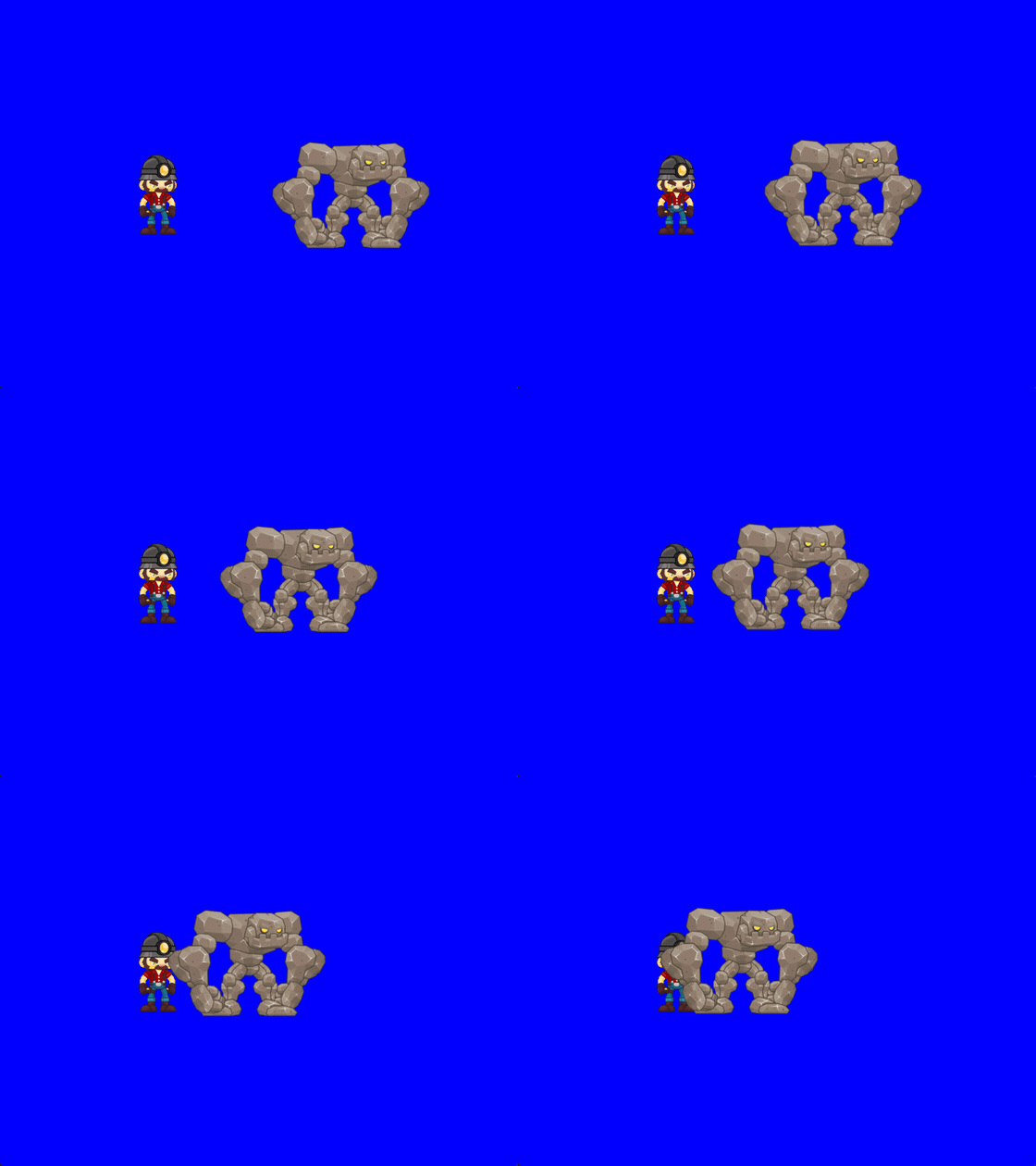
Two things there are worth pointing at. The drag is a force proportional to velocity and pointing against it, which is what stops an object accelerating forever under a constant push: it settles where the applied force and the drag cancel, at force / kd. In the demo the golem is pushed with a force of 30 and has a kd of 0.5, so it tops out at 60 units per second no matter how long the chase lasts, and it eases into that speed instead of snapping to it.
The position is integrated with the average of the old and new velocities rather than with either one of them. Using the old velocity alone lags behind whenever the object is accelerating, and using the new one alone runs ahead; the average is exactly right for a constant acceleration over the step and costs one addition and one divide.
The game does not touch velocity directly. It sets a force each frame – the player’s is a fixed push in whichever direction the keys say, the golem’s is a fixed magnitude toward the player – and everything else falls out of the integration.
Collision system
The collision system works on axis-aligned bounding boxes, and it asks a different question from the obvious one. Rather than testing whether two boxes overlap right now, it asks when during this frame they would touch, given where they both are and how fast they are both going.
The reason is tunnelling. A test at the end of the frame only sees the two end positions, so anything moving faster than its own width in one frame can pass straight through a wall between two frames without ever being seen to overlap it. Sweeping the whole interval cannot miss that.
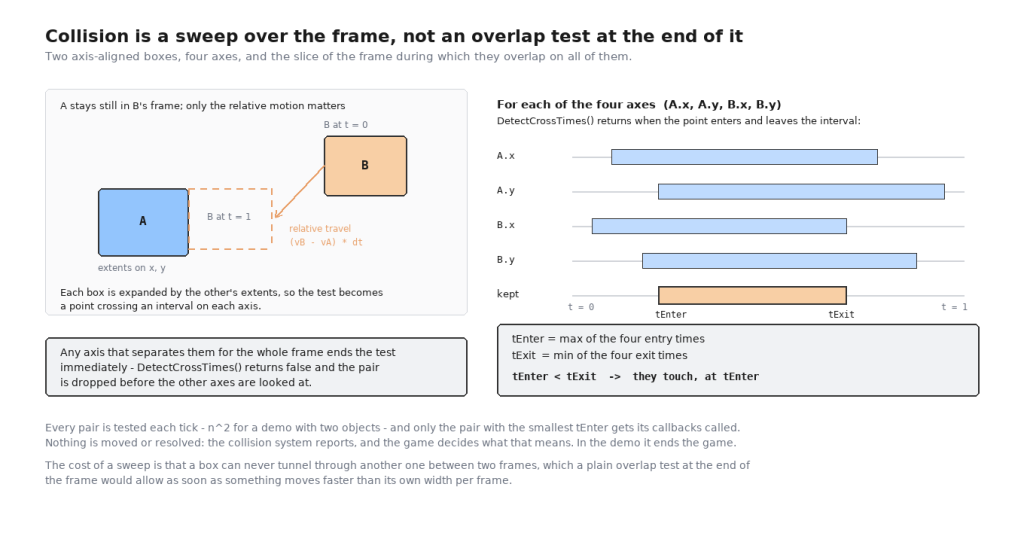
The work is done on one axis at a time. One box is expanded by the other’s extents so that the second box becomes a single point, and then the question on that axis is just when the point enters and leaves an interval:
bool DetectCrossTimes(float i_Center, float i_Extent, float i_Point, float i_Travel, float& o_tEnter, float& o_tExit)
{
    float i_Start = i_Center - i_Extent;
    float i_End = i_Center + i_Extent;

    if (IsZero(i_Travel))
    {
        if ((i_Point < i_Start) || (i_Point > i_End))
            return false;
        else
        {
            o_tEnter = 0.0f;
            o_tExit = 1.0f;
            return true;
        }
    }
    o_tEnter = (i_Start - i_Point) / i_Travel;
    o_tExit = (i_End - i_Point) / i_Travel;

    if (o_tEnter > o_tExit)
        Swap(o_tEnter, o_tExit);

    return !((o_tEnter >= 1.0f) || (o_tExit <= 0.0f));
}
The travel it is given is the relative motion of the two objects over the frame, so one box can be treated as standing still while the other moves. Zero travel is the case worth handling separately: nothing is crossing anything, so the answer is simply whether the point is already inside the interval, for the whole frame or not at all.
CheckCollision2D() runs that four times – once for each object’s x and y axis – and keeps the largest entry time and the smallest exit time seen so far. If any axis reports no crossing at all, the pair is separated on that axis for the entire frame and the test returns immediately without looking at the rest. At the end, tEnter < tExit means there is a slice of the frame during which the boxes overlap on every axis at once, and tEnter is when they first touch.
FindCollision() runs that over every pair and keeps the one with the smallest tEnter. Only that pair gets its callbacks called:
if (FoundCollision.m_pCollideables[0]->m_CollisionCallback)
    FoundCollision.m_pCollideables[0]->m_CollisionCallback(FoundCollision.m_pCollideables[1]->m_GameObject);

if (FoundCollision.m_pCollideables[1]->m_CollisionCallback)
    FoundCollision.m_pCollideables[1]->m_CollisionCallback(FoundCollision.m_pCollideables[0]->m_GameObject);
Both sides are told, and each is handed the other object. The system does not move anything, does not push the boxes apart and does not reflect any velocities – it reports, and the game decides what a collision means. In the demo it means the game is over.
The object-to-world transform of every box is built once at the top of the tick and cached, because the same box is read once per pair it is tested against. That caching pass is also where dead objects are dropped: the collideable holds a weak pointer, so if AcquireOwnership() comes back empty the component is swapped out of the list on the spot.
Running the demo
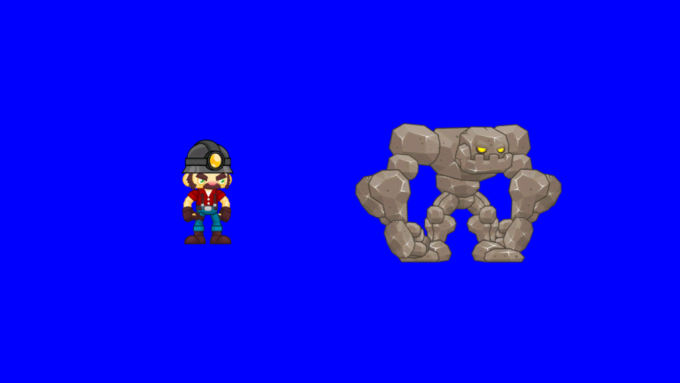
The repository builds as three projects: GLib, Engine and Game. Game/Main.cpp opens a 1024×768 window, asks the factory for the two objects in Game/data, and runs the loop.
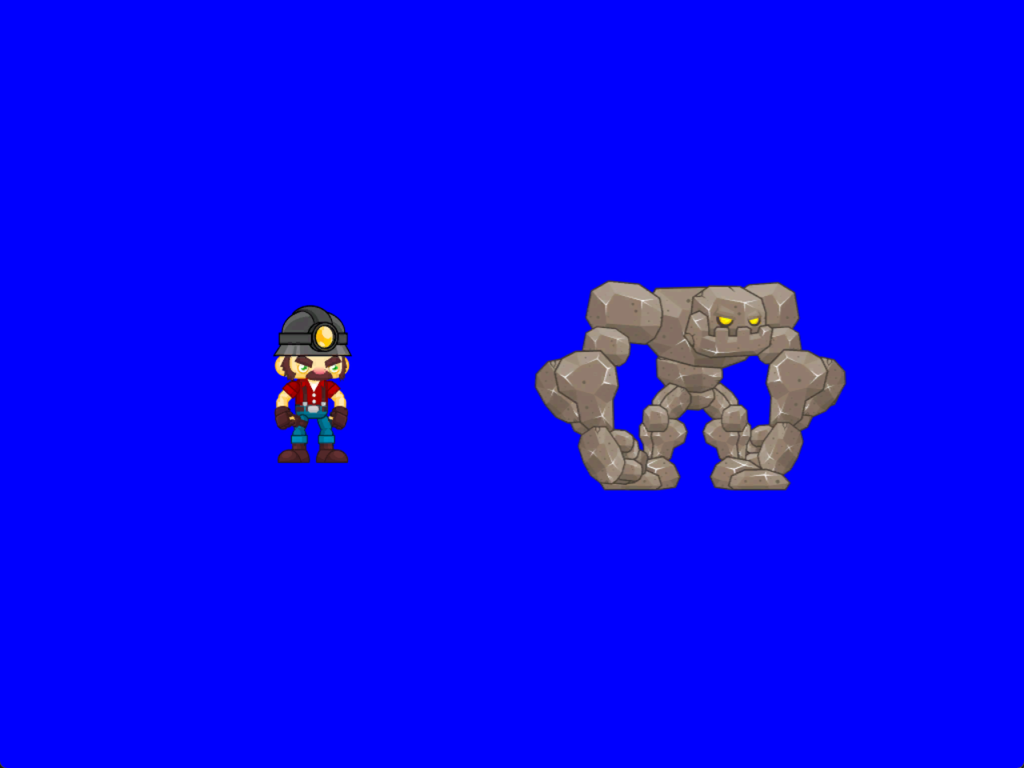
W, A, S and D apply a force to the miner; Q quits. The golem has no input of its own – every frame the game points a fixed-magnitude force at the player’s current position, which with drag makes it accelerate smoothly and then hold a steady chase speed. When the two boxes touch, the collision callback sets the quit flag and the engine shuts down.
Building it from a clean checkout needs nothing but the solution; running the built executable outside Visual Studio needs the data folder next to it, because the file paths in Main.cpp are relative to the working directory.
What I would change now
Reading the code again to write this, four things stand out.
The reference counts are not thread-safe. ReferenceCounters increments and decrements plain uint64_t members with ++ and --. That is fine while everything happens on one thread, but the whole point of the job system is that it does not: a component created on a runner thread copies a SmartPtr<GameObject> while the main thread may be copying another one to the same object, and two unsynchronised increments can land as one. std::shared_ptr uses an atomic count for exactly this reason. The fix is already sitting in the engine – AtomicIncrement/AtomicDecrement in AtomicOperations.h, which JobStatus uses and which has a uint64_t overload. The counters should have gone through it.
Applying a force overwrites it instead of accumulating it. ApplyForceToMoveable() assigns, so a moveable only ever has one force on it. The demo works around that by zeroing the force at the top of every frame and then setting one:
Physics::ApplyForceToMoveable(GameObject1Moveable, Vector2::Zero);

if (keyStates[W]) Physics::ApplyForceToMoveable(GameObject1Moveable, verticalForce);
if (keyStates[A]) Physics::ApplyForceToMoveable(GameObject1Moveable, -horizentalForce);
if (keyStates[S]) Physics::ApplyForceToMoveable(GameObject1Moveable, -verticalForce);
if (keyStates[D]) Physics::ApplyForceToMoveable(GameObject1Moveable, horizentalForce);
Hold W and D together and the second call overwrites the first, so the player cannot move diagonally – a visible bug that follows directly from the interface. ApplyForce() should add to an accumulator that the physics tick clears after integrating, which is also what lets several sources – input, a chase, gravity, a knockback – act on the same object at once.
Collision has no broad phase. Every collideable is swept against every other one, every tick, and the whole pass then reports a single pair – the earliest one. Two objects make that invisible, but the cost is quadratic and a real scene wants a spatial partition in front of the narrow phase. Reporting only one pair is the bigger limitation of the two: three objects meeting in the same frame produce one callback, and the other contact is silently dropped until the next tick.
Shared state is declared static in headers. The two creator registries in GameObjectFactory.h, and the start-up and shutdown lists in StartupShutdown.h, are namespace-scope static variables in header files, so every translation unit that includes them gets a private copy. It works today only because the code that touches them lives in the one matching .cpp; the moment a second file tries to register a creator directly it will write into a copy nobody reads. Those belong in the .cpp behind functions, which is where the accessors already are.
Source and credits
- Engine and demo: My2DGameEngine, all of
Engine/andGame/. GLib/is the graphics library provided with the course – window, input, Direct3D 11 device and sprite batch. Its DDS texture loader is Microsoft’sDDSTextureLoader.- JSON parsing is nlohmann/json, vendored as a single header.