Submit-tool-mod: a fork of Unreal’s SubmitTool with an OpenProject integration

SubmitTool is a tool Epic ships in the Unreal Engine source for submitting to Perforce. It takes over a Perforce changelist and runs a set of checks before it lets you press Submit: compile the C++ in the changelist, validate the assets in it, check the tags in the description, wait for a successful Horde preflight.
Submit-tool-mod is a maintained fork of it that does two things. It replaces the built-in Jira integration with a native OpenProject one: sign in from the tool, pick one of the work packages assigned to you and attach it to the changelist, and on submit leave a comment on that work package with the review and preflight links. And it fixes a red error line the tool printed at startup. The repository also carries the build, package and distribute procedure that gets the tool onto every workstation through UnrealGameSync, and the configuration template we use. Once it’s installed, a team member right-clicks a changelist in P4V, or presses Submit Content in the editor, and this is what opens.
It’s on GitHub: YexiangZHOU/Submit-tool-mod. It works against the Perforce, Swarm, Horde and OpenProject in Indie studio infra stack, which has an article of its own. This post covers what SubmitTool is, what a team member sees once it’s installed, how the OpenProject integration works, how the tool gets onto workstations, and what it can’t do.
Contents
Why fork it
SubmitTool’s source lives in the engine under Engine/Source/Programs/SubmitTool. To use it you build, package and distribute it from the engine source yourself, and the install script Epic ships depends on an executable that isn’t in the engine tree. The configuration is a standard UE ini with a lot hanging off it: tags, validators, Horde preflights, Swarm reviews, self-update. We wanted the tool to run the checks everyone should run before submitting, the same set for everyone.
Its issue-tracker integration only knows Jira. The config section is [SubmitTool.Jira], login is Atlassian Cloud’s OAuth, and on submit it files a Jira Service Desk request. We use OpenProject. There’s no interface behind the integration: FJiraService is registered and called by its concrete type, so swapping the backend means editing the source, and a plugin can’t do it; that’s why this is a fork.
The other change started with a red line. Launched from P4V or UGS, the tool printed a red p4 where: Path ... is not under client's root as its first log line. The tool worked, but the line made it look as if the submit was broken. The cause is that on an empty changelist it ran p4 where with no arguments, which resolves the process’s working directory, and the tool sets that directory to the exe’s own folder at startup. The fork adds an empty-list check, nine lines including the comment.
What a team member sees
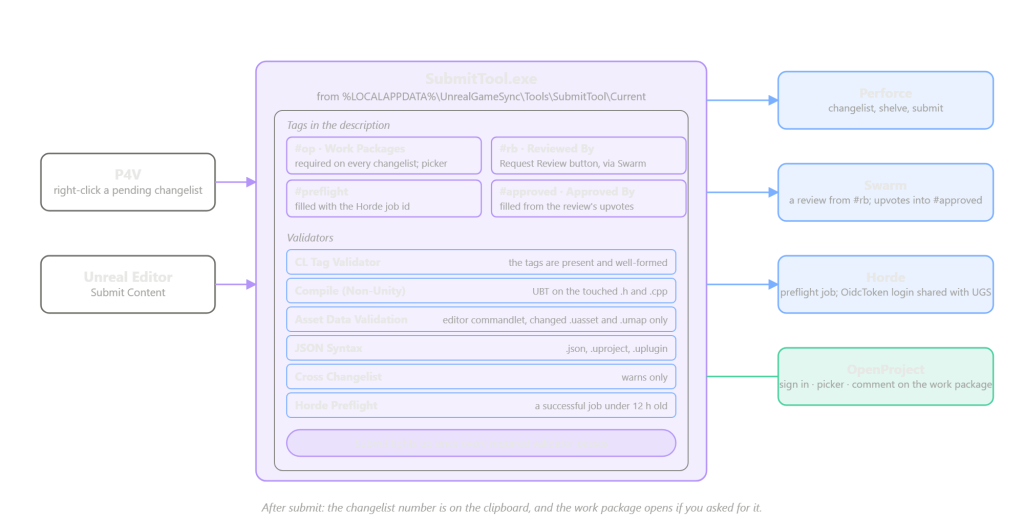
Right-click a pending changelist in P4V and there’s a SubmitTool entry in the menu. It opens a window: the changelist description at the top, editable, and edits are written back to Perforce; the tags in the middle; the validator list and the Submit button below. The editor works the same way. With the SubmitToolEditor plugin enabled, Submit Content no longer opens the editor’s own submit dialog but this tool, with the current Perforce connection and changelist on its command line.
Tags are #-prefixed fields in the description, and each gets a row in the window. Our config has four. #op is the OpenProject work package number. It’s required on every changelist, with none for a change that has no work package, and it has an OpenProject button next to it that opens the picker, covered below. #rb is who you asked to review, a Perforce user or group, and the row has a Request Review button that creates a Swarm review. As soon as a changelist contains even one code file, #rb becomes required; pure asset submits can leave it out, and a change too small to review can say skip. #preflight is the Horde preflight job id, and the tool fills it in itself. #approved is who upvoted the Swarm review; the tool reads that from the review and fills it in, and it’s required for code the same way.
There are six validators. CL Tag Validator checks that the tags above are present and well formed. Compile (Non-Unity) runs UBT on the .h and .cpp files in the changelist with unity builds and PCH off, and warnings as errors, which catches the compile errors that unity builds hide. Asset Data Validation launches the editor with a commandlet and validates only the .uasset and .umap files in the changelist. JSON Syntax parses .json, .uproject and .uplugin, since a hand-edited one of those fails late, when the editor refuses to load. Cross Changelist looks for a .h and .cpp pair split across two changelists, and only warns. Horde Preflight requires a successful preflight for this changelist that’s under twelve hours old. A validator only runs when the changelist has files of its kind, so a pure asset submit doesn’t compile anything. Except for Cross Changelist, which warns, all of them have to pass before the Submit button lights up.
For a preflight, press the button on the #preflight row. The tool waits for the local validators to finish, shelves the changelist, and opens the Horde dashboard’s preflight page in the browser, with the template set in the config. From then on it polls Horde’s REST API every minute or two, and once it finds the preflight job for this changelist it writes the job id into #preflight; when the job succeeds the validator turns green. Talking to Horde takes an OIDC token, which the tool gets through Epic’s OidcToken, using the same cached login as UGS, so anyone who has signed in to UGS doesn’t sign in again.
After a successful submit, the changelist number is on the clipboard. If Open Work Package on Submit is ticked, the browser opens the work package from #op.
How the OpenProject integration works
The integration does three things: sign in, pick a work package, and leave a comment on submit. Sign-in uses OpenProject’s own OAuth2, authorization code with PKCE. The tool is a public client, and the exe carries no secret. Press Log In and the browser opens OpenProject’s authorize page, OpenProject hands you to SSO, and after that it redirects to http://127.0.0.1:8451/submittool/code, where the tool has a listener waiting; it takes the authorization code and exchanges it for a token with the code verifier. Access tokens expire after two hours, and the tool refreshes them with the refresh token, storing the new refresh token it gets back each time. Logging out revokes the token on OpenProject first and then clears it locally. PKCE needs SHA-256, and UE’s Core has no implementation of it that works on Windows, so the fork statically links OpenSSL for that one hash.
Picking a work package goes through the OpenProject button on the #op row, which opens a Select Work Packages window listing the work packages assigned to you, across every project you can see, each with its id, type, status, subject and a link to OpenProject. Closed and rejected ones are hidden until you tick Include Closed. The config can narrow it to one project. Pick one and its id is in #op.
The comment on submit goes through Epic’s existing integration entry: Open Integration Window, then Request Integration, and that button only works once the required validators are green. The tool creates the Swarm review first, or updates the review description if there already is one, then GETs the work package by id as an existence and permission check, then POSTs a comment on it. The comment looks like this:
**SubmitTool submit**

- **Changelist:** 1234
- **Stream:** //Game/Main
- **Swarm review:** https://swarm.example.com/reviews/56
- **Horde preflight:** https://horde.example.com/job/66f1a2b3c4d5e6f708192a3b

> Fix the ladder collision on the second floor of the warehouse
> #op 78 #rb alice #preflight 66f1a2b3c4d5e6f708192a3b #approved alice
All four fields are always there, with a placeholder where there’s no value, and the description follows as a blockquote. If the work package doesn’t exist or you have no access, you get a dialog and nothing is posted; if the post fails, you get a dialog and can retry. The tool never reports a failed post as a success.
We chose a comment over a new work package or a custom field because what we want is a trail; the Jira version’s service-desk request is an approval queue, and we have no use for one. One work package sees many submits and many CI runs, and comments accumulate into a timeline, whereas a custom field holds one value and each submit would overwrite the last. OpenProject has no equivalent of a service-desk request anyway; the closest is creating a work package per submit, which is a different workflow.
The fork touches 31 files, 1313 lines added and 1210 removed, most of it JiraService.cpp becoming OpenProjectService.cpp. Every Jira-derived name is gone except one: the local token file is still called jira.dat, so people who signed in before the rename don’t have to sign in again.
The [SubmitTool.OpenProject] section has six keys: bDisableOpenProject, ServerAddress, OAuthClientId, OAuthScope, RedirectPort and ProjectFilter. It’s disabled by default, so a config without the section gets a tool with no OpenProject feature and a greyed-out #op button. Two things happen on the OpenProject side: register an OAuth application in the admin UI, public client with PKCE and the redirect above; and give submitters the permission to add comments in the project. In OpenProject that’s a permission of its own, and seeing a work package doesn’t imply being able to comment on it.
Getting it onto every workstation
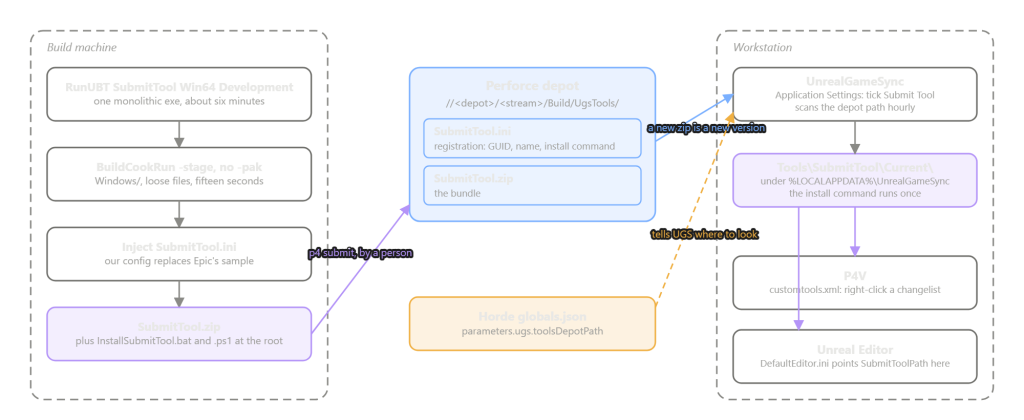
The build happens on the build machine: RunUBT.bat SubmitTool Win64 Development, about six minutes on a machine where the engine is already built, and the output is a single monolithic exe with no module DLLs. Packaging is BuildCookRun -stage with no -pak, and the config is the reason. Without a pak, SubmitTool/Config/SubmitTool.ini is an ordinary file in the bundle that can be replaced with our config at package time and edited if something goes wrong; with a pak, the config is sealed inside. The step only copies files and takes fifteen seconds. Then config/SubmitTool.ini.example from the repository gets filled in and written over Epic’s sample config in the bundle, the two installer scripts go at the root, and it’s zipped. One script is Epic’s InstallSubmitTool.ps1, unchanged, which writes the tool into P4V’s customtools.xml; the other, InstallSubmitTool.bat, is ours, one line, and calls the first.
Distribution rides UGS’s tools channel. Two files go in the depot, Build/UgsTools/SubmitTool.ini and SubmitTool.zip. The first is the registration UGS reads: a GUID, a name and an install command. Horde’s globals.json points parameters.ugs.toolsDepotPath at that directory; UGS gets the path from Horde and scans it hourly. A member ticks Submit Tool in UGS’s Application Settings, UGS unpacks the zip into %LOCALAPPDATA%\UnrealGameSync\Tools\SubmitTool\Current, runs the install command once, and the P4V context menu has the entry. A later update is a new zip submitted to the same path, and UGS pulls it within the hour or at its next start. The SubmitTool.ini in the depot and the SubmitTool.ini inside the zip share a name and nothing else: UGS reads the first, the tool reads the second.
The editor path goes through SubmitToolEditor, an Experimental plugin in the engine. It’s enabled in the project’s .uproject, and Config/DefaultEditor.ini points SubmitToolPath at the folder UGS unpacked into, with $(Port), $(User), $(Client), $(Changelist) and $(RootDir) in the arguments, which the plugin substitutes when it launches the tool. The plugin’s DLL travels with the precompiled editor binaries and the ini with an ordinary p4 sync, and both have to be in the depot. Content workspaces sync no engine source and can’t build the plugin, so the plugin can only reach them prebuilt, through the build pipeline.
Everything site-specific is in that one config file, and almost all of it is $(...) tokens; $(root), $(engine), $(CL) and the rest are resolved by the tool, and the only project-specific line is PathOverrides=(("$(project)", "<project name>")). One thing doesn’t fit in the config: the Swarm URL. The tool reads it off the server with p4 property -l -n P4.Swarm.URL, and if the server doesn’t have that property set, #rb does nothing and reports nothing.
Asset validation checks the changelist, not the project
Asset Data Validation runs an editor commandlet, and which one is a single word in the config. The engine’s own DataValidation validates the whole project and ignores -P4Changelist. On our validation project, a two-asset submit ran through 3879 assets and reported 96 errors that had nothing to do with the submit, and every one of them blocked it.
ContentValidation is a different commandlet, one Lyra ships, which reads -P4Changelist, runs p4 opened to get the file list, and validates just those. It didn’t work as shipped. When converting depot paths to package names it hard-codes folder names like LyraGame/Content/, and anything that doesn’t match is dropped without a word, after which it reports success with zero assets validated. The repository records three changes to it: path resolution goes through the engine’s generic conversion and warns when it can’t resolve a file; the -P4Client argument takes precedence over the editor’s saved settings; and the p4 where output parsing has an off-by-one fixed and the path quoted. The numbers after that:
| Submit | Assets validated | Errors |
|---|---|---|
| the engine’s DataValidation, 2 assets | 3879 | 96, none of them from this submit |
| ContentValidation, 3 clean assets | 3 | 0 |
| the same 3 plus 1 known-corrupt asset | 4 | 1, the corrupt one |
This is project code, not fork code. docs/asset-validation.md in the repository covers porting it to another project.
What it can’t do
SubmitTool is a workstation tool, launched from P4V or the editor. Someone who runs p4 submit directly skips every tag, validator and preflight. Real enforcement is server-side, a Perforce trigger or Swarm’s workflow rules, and neither is in this repository. #approved isn’t a gate either: it’s filled from Swarm when the changelist is opened and when you press Refresh, the text box stays editable, and the submit path never asks Swarm again. What it gives you is the truth filled in for free, and a faked value gets overwritten the next time the changelist is opened. It catches forgetting to get a review, not deciding to skip one.
An engine upgrade means merging these changes forward again. The fork’s vendor branch holds the pristine engine source and is an ancestor of main, so git diff vendor main -- fork/ is the whole change set. The design is to replace the two subtrees on vendor with the new engine’s copies and merge back into main, letting git do the three-way merge.
Where to start
The repository: YexiangZHOU/Submit-tool-mod. docs/submittool-capabilities.md lists everything the tool can do and which of it we turned on; config/SubmitTool.ini.example is the full config template, with a comment above every key; docs/build-package-distribute.md has every command from the build to the depot; and the OpenProject integration’s design starts at docs/openproject-overview.md.
The base stack it runs against: YexiangZHOU/Indie-studio-infra-stack, which has an article of its own. The OpenProject integration on the Horde side is a separate repository, YexiangZHOU/Horde-extension, also with its own article.