Redesigned Intro of The Division 2: A Level Design Practice

This is a level design test finished within three days.
The level is a redesign of the intro part for Tom Clancy’s The Division 2. The goal is to help the player understand and learn all the basic key elements of the game. The level introduces one friendly NPC and one of the new enemy archetypes. When players experience the entire level, there is a rising dramatic curve in combats and objectives.
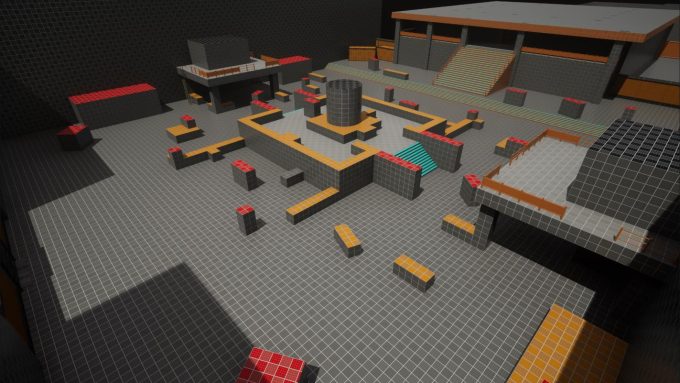
Two deliverables came out of the three days: the level design document (PDF, 2.5 MB) and a blockout of the level built in Unreal Engine. The video below walks through the blockout with a combat mechanics showcase; for the gameplay flow please check the document, which is reproduced in full after the video.
Contents
Level Details
The enemy archetypes and the stats used in the gameplay flow tables are described in the two sections after this one.
Level Overview
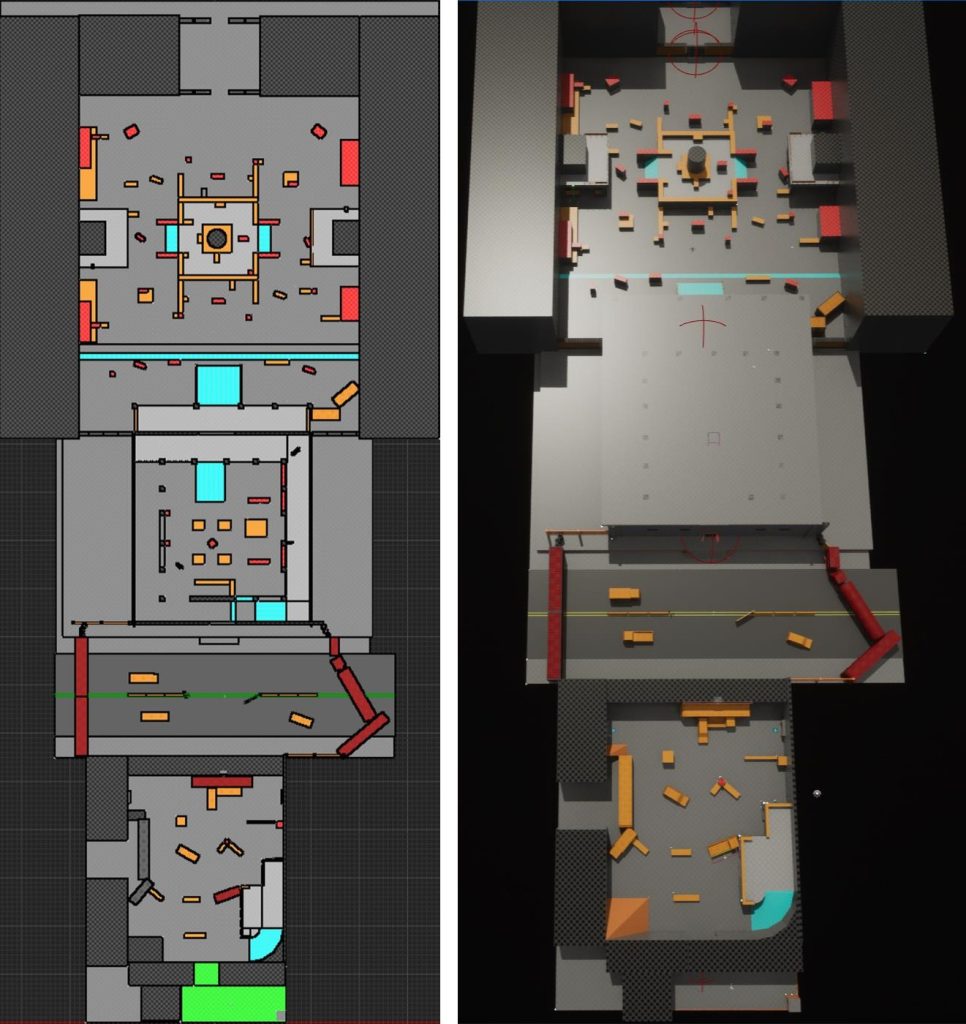
Beat 1
3D Blockout
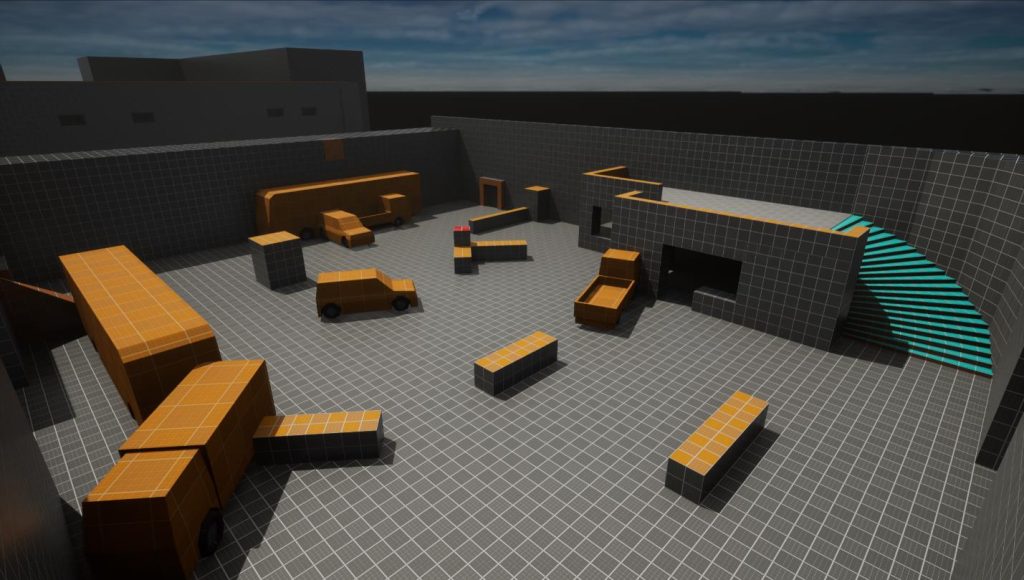
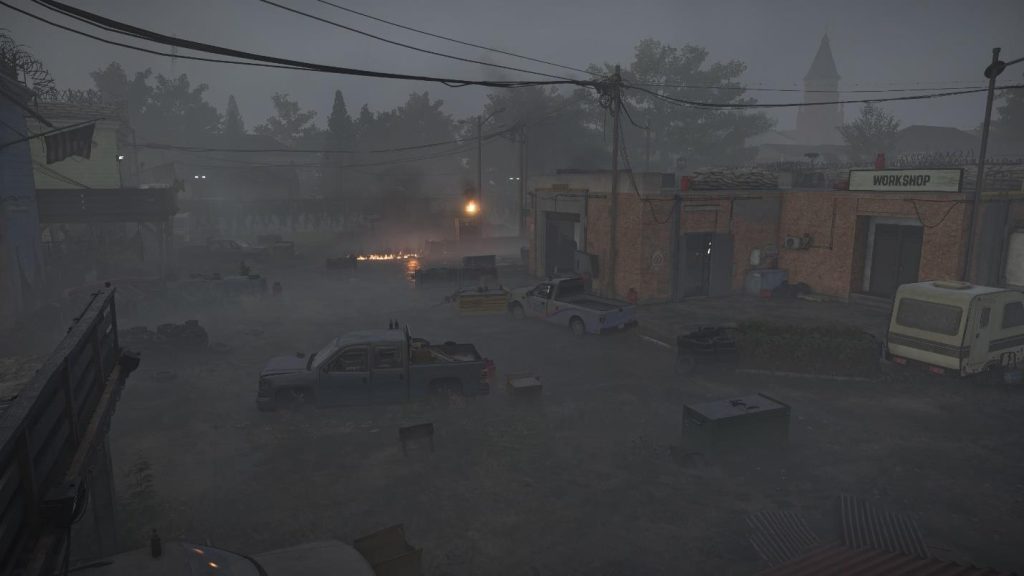
Visual Art Reference
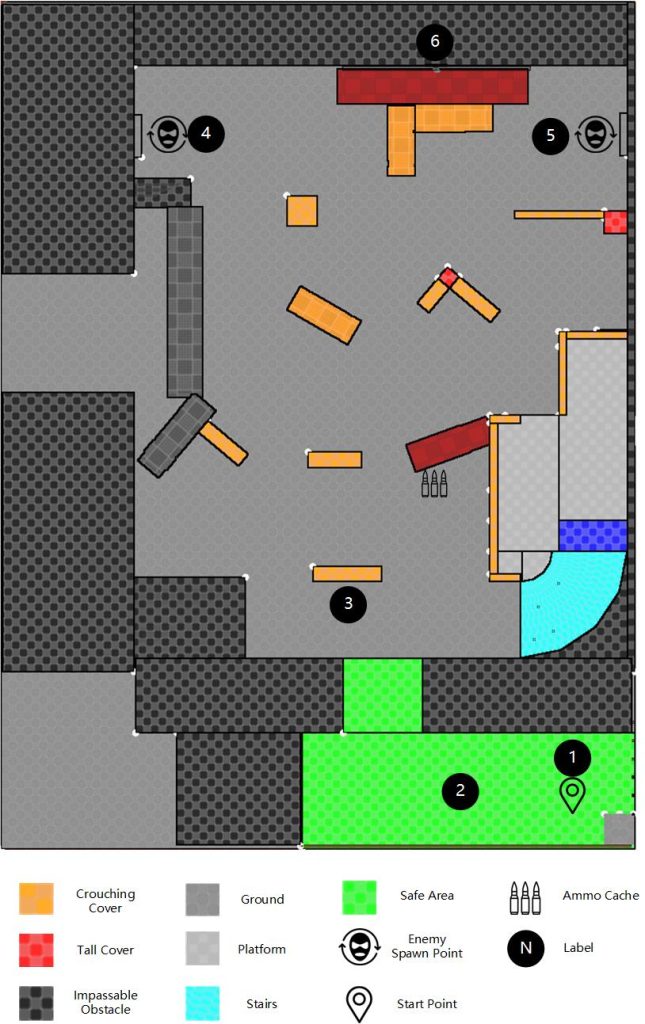
2D Top-Down
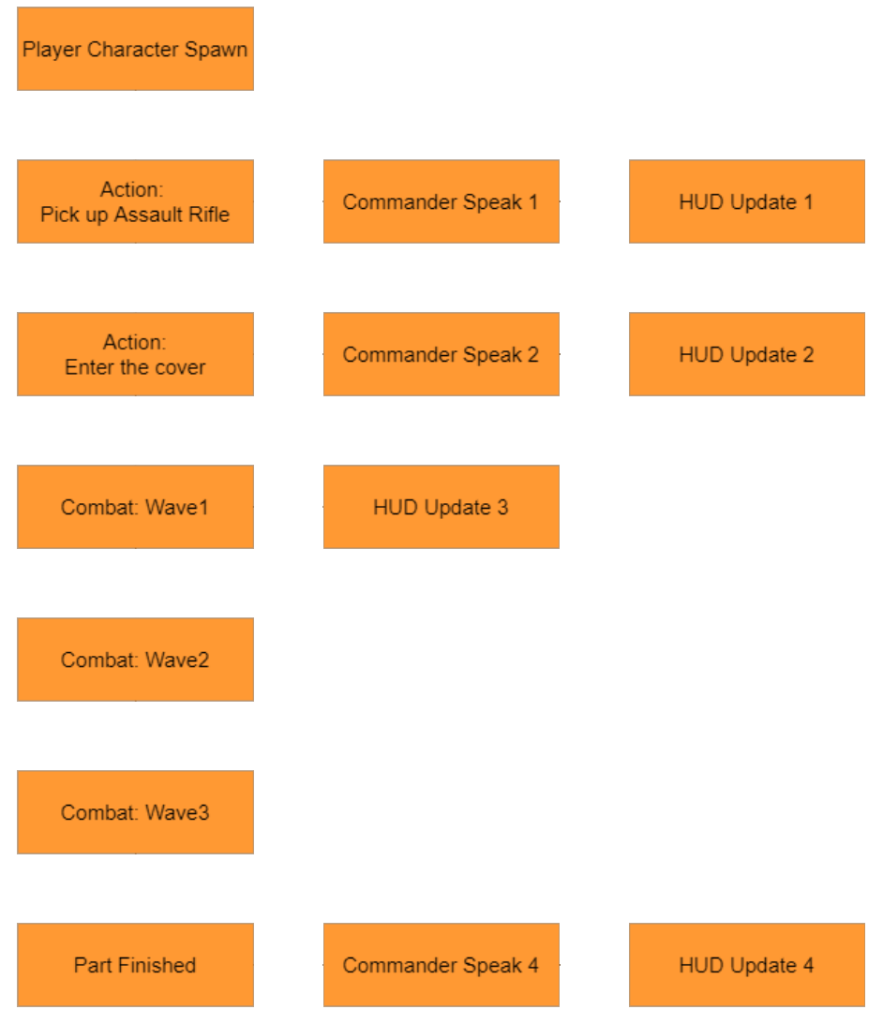
Gameplay Flow
| Type | Name | Details | End/Trigger Next |
|---|---|---|---|
| Main Flow | Player Character Spawn | Level begins. Player character spawns at (1). | Spawn completed. |
| Main Flow | Action: Pick up Assault Rifle | Require the player to pick up the assault rifle at (2). | Player picks up the assault rifle |
| Sub Flow | Commander Speak 1 | Audio: “Agent, be careful. We’ve got a few enemies approaching. Use the weapon.” | N/A |
| Sub Flow | HUD Update 1 | Objective info: “Pick up Assault Rifle”; Mark on screen: assault rifle item object | Main flow end |
| Main Flow | Action: Enter the cover | Require the player to enter the cover at (3). | Player enters the cover |
| Sub Flow | Commander Speak 2 | Audio: “Now find your cover, and be prepared to fight!” | N/A |
| Sub Flow | HUD Update 2 | Objective info: “Enter the cover”; Mark on screen: the cover at (3). | Main flow end |
| Main Flow | Combat: Wave 1 | 3 Assaults spawn randomly at (4) or (5). Initialize to combat state. | 1 or fewer enemies left |
| Sub Flow | HUD Update 3 | Objective info: “Secure the area.” | Combat: Wave 3 end |
| Main Flow | Combat: Wave 2 | 2 Assaults, 1 Rusher spawn randomly at (4) or (5). Initialize to combat state. | 1 or fewer enemies left |
| Main Flow | Combat: Wave 3 | 4 Assaults spawn randomly at (4) or (5). Initialize to combat state. | No enemies left |
| Main Flow | Beat Finished | Require the player to cross the exit point at (6) | Player crosses the exit point |
| Sub Flow | Commander Speak 4 | Audio: “Good work, Agent. Now climb over the wall. Someone needs your help.” | N/A |
| Sub Flow | HUD Update 4 | Objective info: “Climb over the wall”; Mark on screen: the exit point at (6) | Main flow end |
Beat 2
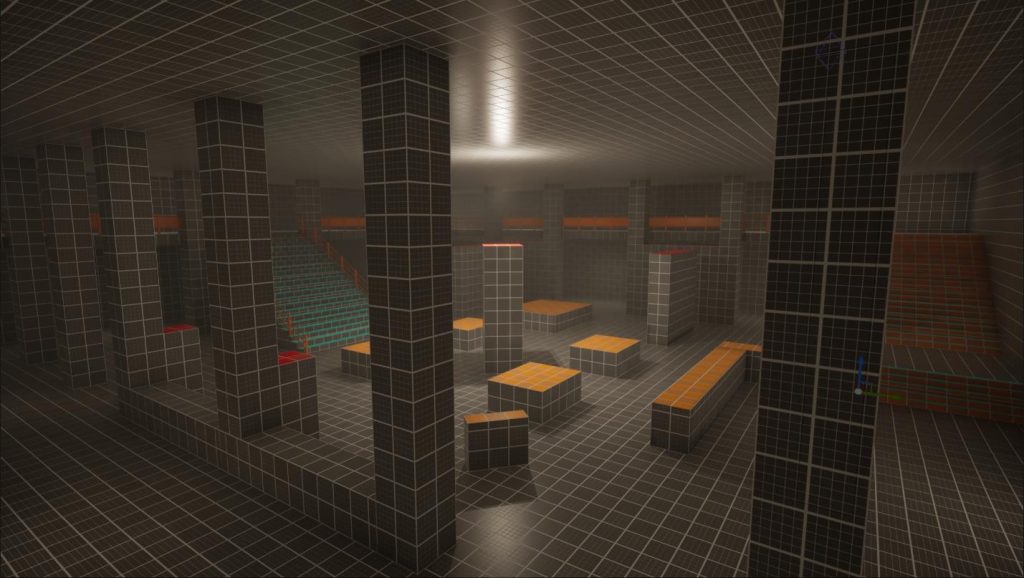
3D Blockout
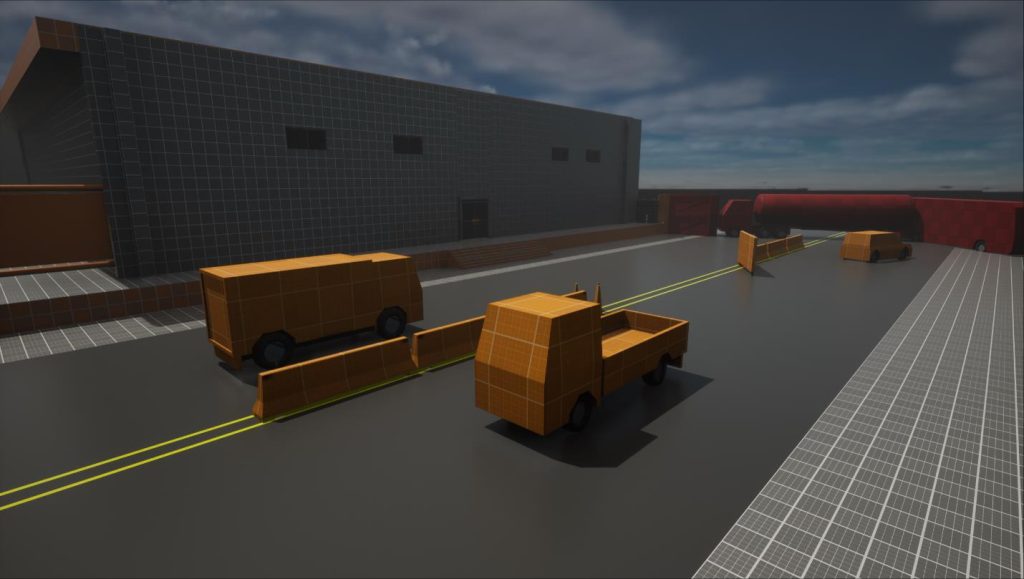
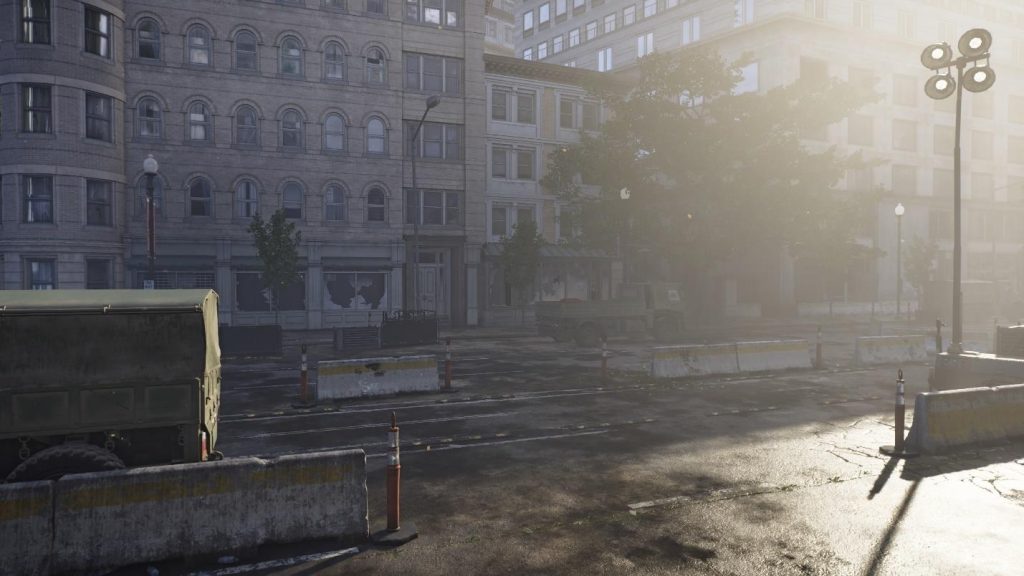
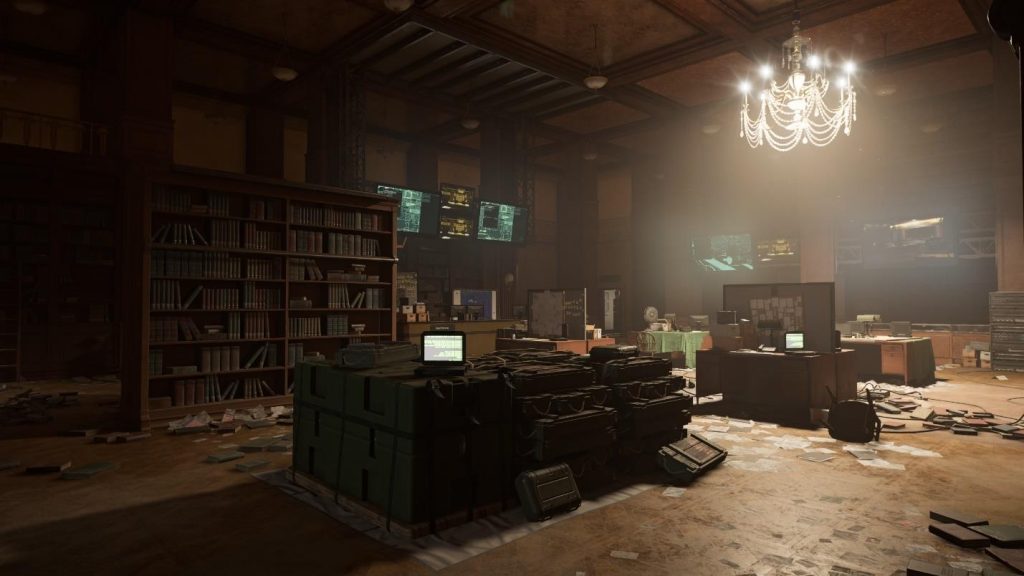
Visual Art Reference
2D Top-Down
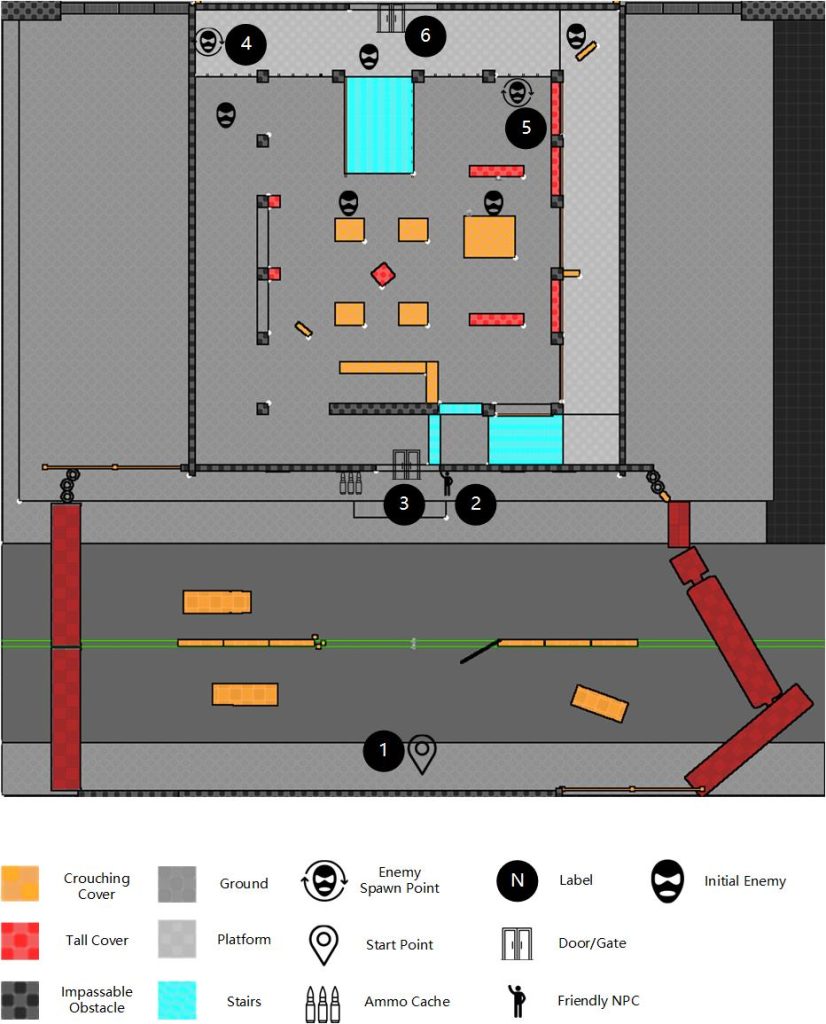
Gameplay Flow
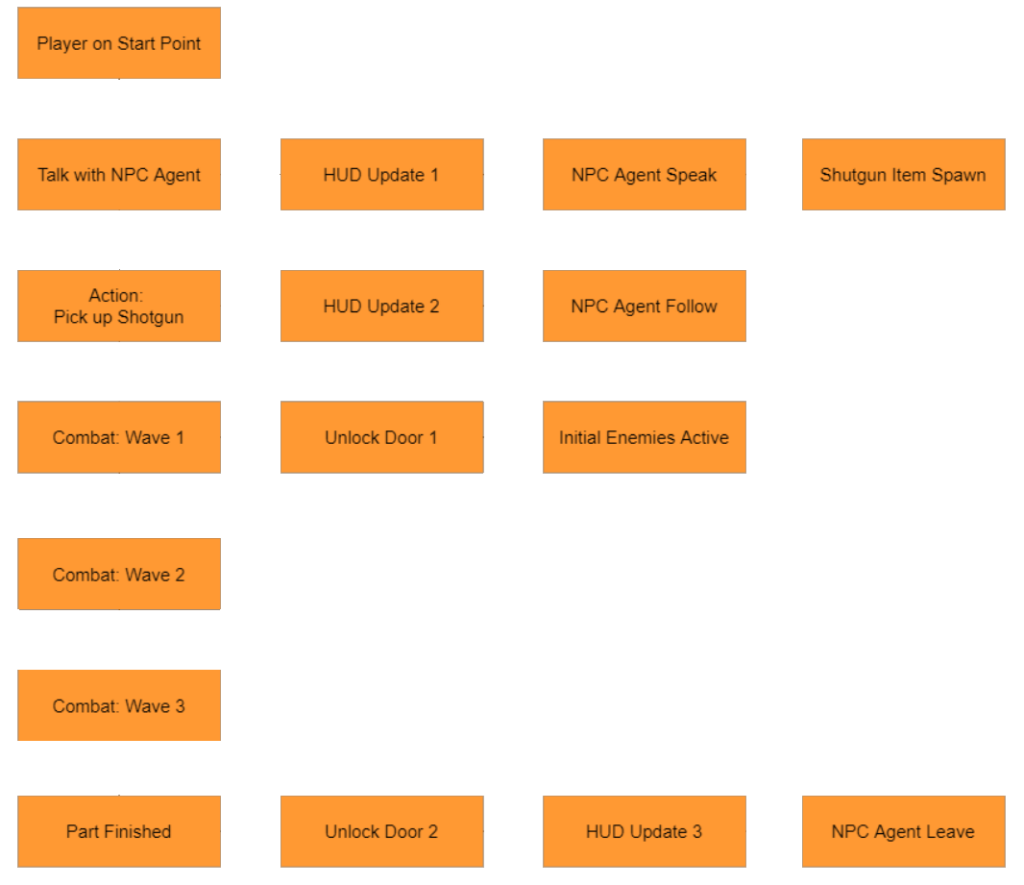
| Type | Name | Details | End/Trigger Next |
|---|---|---|---|
| Main Flow | Player on Start Point | Player reaches the Start Point at (1) | Player reaches the Start Point |
| Main Flow | Talk with NPC Agent | Talk with NPC Agent | NPC Agent speak end |
| Sub Flow | HUD Update 1 | Objective info: “Talk with Agent XXX.”; Mark on screen: NPC Agent at (2) | Main flow end |
| Sub Flow | NPC Agent Speak | Audio from him with animations: “There are many enemies inside, and I cannot defeat them alone. Take this and let’s fight together.” | N/A |
| Sub Flow | Shotgun Item Spawn | Trigger event: NPC Agent Speak end; Shotgun item spawns at the NPC agent’s position. | Shotgun item spawned |
| Main Flow | Action: Pick up Shotgun | Require the player to pick up the shotgun. | Player picks up the shotgun |
| Sub Flow | HUD Update 2 | Objective info: “Pick up Shotgun.”; Mark on screen: Shotgun Item | Main flow end |
| Sub Flow | NPC Agent Follow | NPC Agent keeps following the player. | Combat state active |
| Main Flow | Combat: Wave 1 | 3 Assaults and 2 Rushers at all initial enemy positions | 1 or fewer enemies left |
| Sub Flow | Unlock Door 1 | Unlock the door at (3) | Door Unlocked |
| Sub Flow | Initial Enemies Active | Trigger event: Player opens the door at (3); Set all initial enemies combat state. | N/A |
| Main Flow | Combat: Wave 2 | 4 Rushers and 2 Snipers spawn randomly at (4) or (5). Initialize to combat state. | 1 or fewer enemies left |
| Main Flow | Combat: Wave 3 | 4 Assaults, 1 Sniper and 1 Tank spawn randomly at (4) or (5). Initialize to combat state. | No enemies left |
| Main Flow | Beat Finished | Require the player to cross the exit point at the door (6) | Player crosses the exit point |
| Sub Flow | Unlock Door 2 | Unlock the door at (3) | Door Unlocked |
| Sub Flow | HUD Update 3 | Objective info: “Leave the building.”; Mark on screen: the door at (6) | Main flow end |
| Sub Flow | NPC Agent Leave | NPC Agent goes out through the door at (3) and is destroyed. | N/A |
Beat 3
3D Blockout
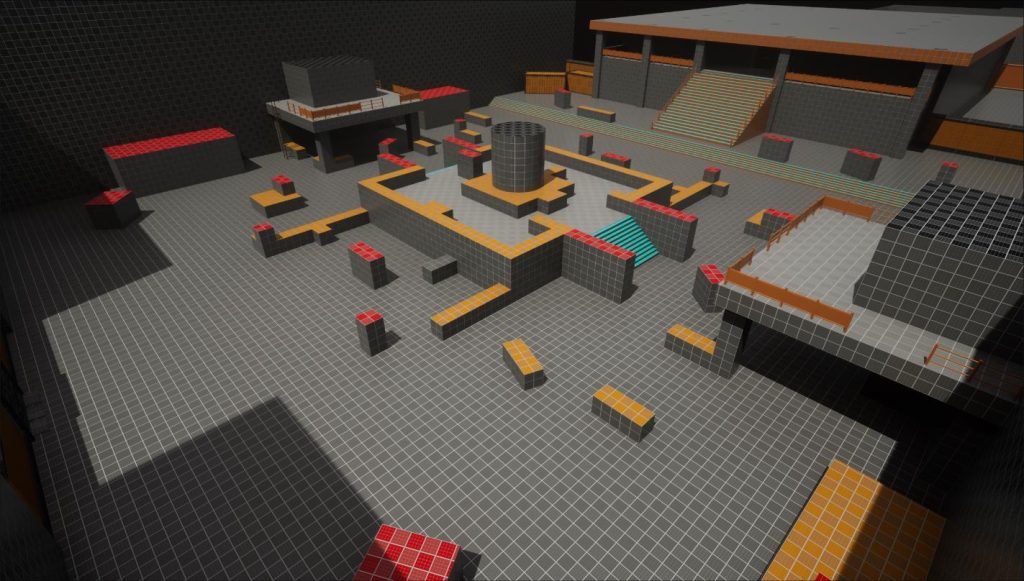
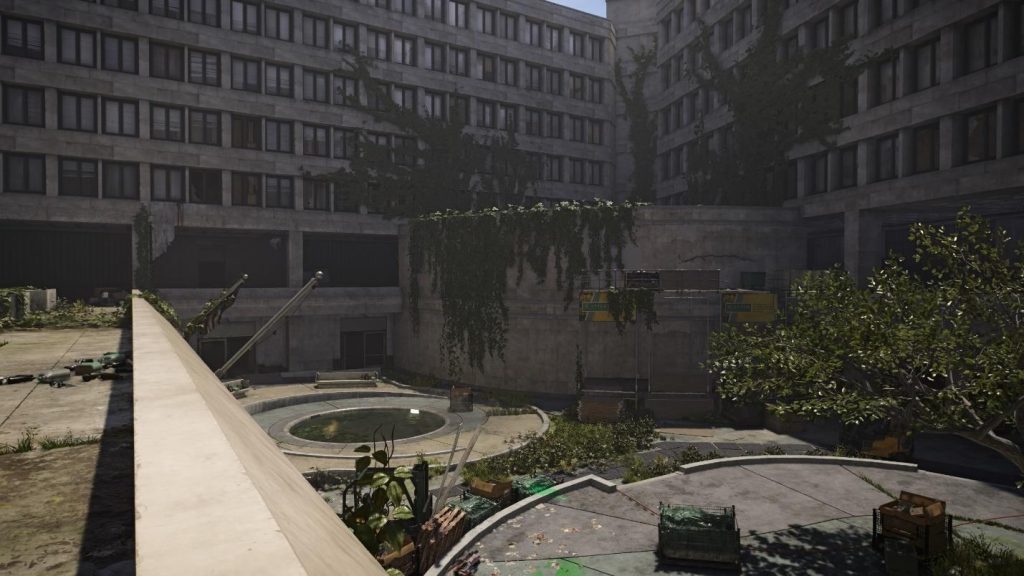
Visual Art Reference
2D Top-Down
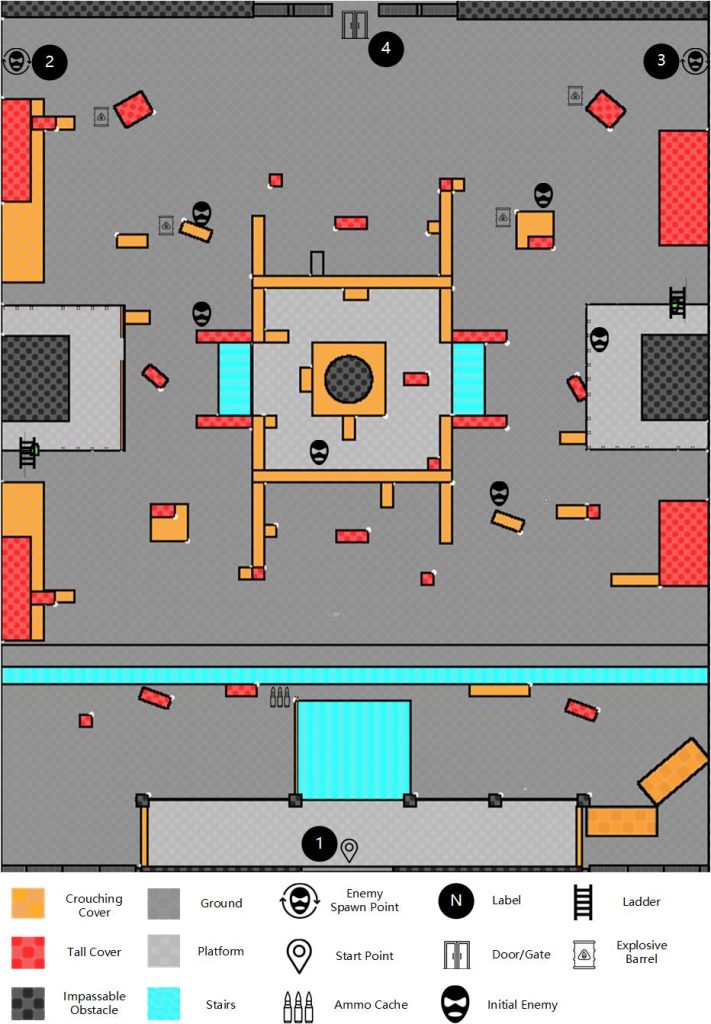
Gameplay Flow
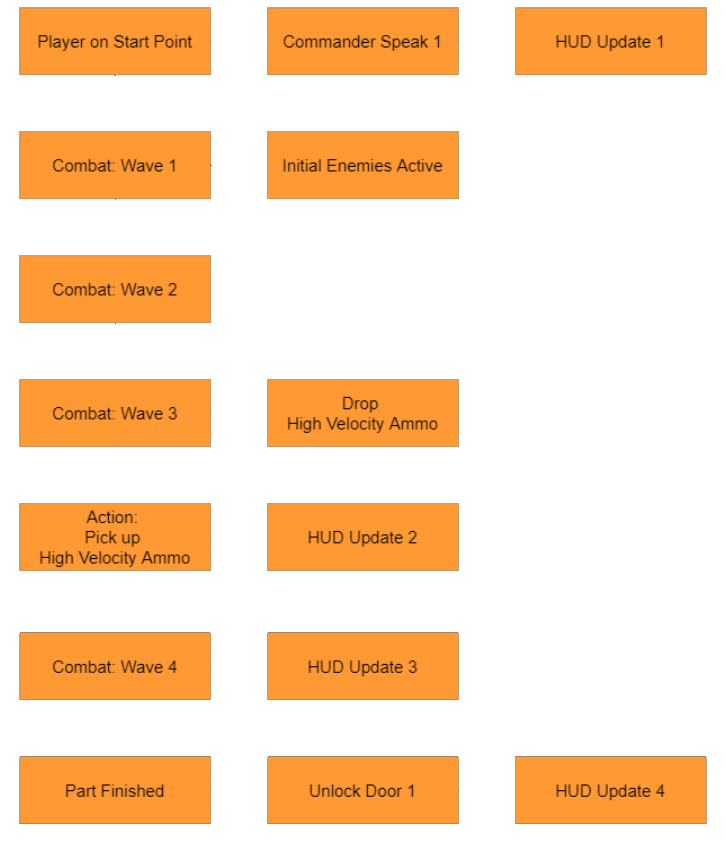
| Type | Name | Details | End/Trigger Next |
|---|---|---|---|
| Main Flow | Player on Start Point | Player reaches the Start Point at (1) | Player reaches the Start Point |
| Sub Flow | Commander Speak 1 | Audio: “Agent, we have received news that there are a large number of threats near the White House. Please be careful.” | N/A |
| Sub Flow | HUD Update 1 | Objective info: “Secure the area.” | HUD Update 2 |
| Main Flow | Combat: Wave 1 | 4 Assaults, 2 Snipers at all initial enemy positions | 1 or fewer enemies left |
| Sub Flow | Initial Enemies Active | Trigger event: Player attacks or enters enemies’ sight; Set all initial enemies combat state. | N/A |
| Main Flow | Combat: Wave 2 | 2 Rushers, 1 Sniper, 3 Assaults spawn randomly at (2) or (3). Initialize to combat state. | 1 or fewer enemies left |
| Main Flow | Combat: Wave 3 | 4 Rushers, 2 Snipers, 2 Tanks, 3 Assaults spawn randomly at (2) or (3). Initialize to combat state. | No enemies left |
| Sub Flow | Drop High Velocity Ammo | Trigger event: combat: Wave 3 end; Spawn High Velocity Ammo item at the position of the last dead enemy. | N/A |
| Main Flow | Action: Pick up High Velocity Ammo | Require the player to pick up High Velocity Ammo. | Player picks up the High Velocity Ammo |
| Sub Flow | HUD Update 2 | Objective info: “Pick up High Velocity Ammo.”; Mark on screen: High Velocity Ammo Item | Main flow end |
| Main Flow | Combat: Wave 4 | 1 Nano Armor Tank, 2 Snipers, 1 Tank, 5 Assaults spawn randomly at (2) or (3). Initialize to combat state. | No enemies left |
| Sub Flow | HUD Update 3 | Objective info: “Eliminate the enemy leader and secure the area.”; Mark on screen: Nano Armor Tank | Main flow end |
| Main Flow | Beat Finished | Require the player to cross the exit point at the gate (4) to enter the White House. | Player crosses the exit point |
| Sub Flow | Unlock Door 1 | Unlock the gate at (4) | Gate unlocked |
| Sub Flow | HUD Update 4 | Objective info: “Enter the White House.” Mark on screen: the gate at (4). | Main flow end |
AI Design
The AI archetypes used in this level, with a brief description and a brief combat-state behavior tree for each. (AI in the real game is far more complicated than this; these are only examples that give each archetype a different strategy in this level.)
Enemies
Assault
This archetype is the most common enemy found around the map. Assaults will usually engage players from a distance and will attempt to flank them if in cover. Although they may be weak, they can deal high damage when in large groups.
Rusher
Rushers are enemies equipped with shotguns. As their name implies, they rush toward the player, striking them and hosing them down with their shotguns, dealing massive amounts of damage at close range.
Sniper
The Sniper wields a sniper rifle that can deal heavy damage from long range. Snipers are very easy to kill as they have very low health.
Tank
Tanks wield Light Machine Guns and can dish out heavy damage to a player that’s not in cover. They will usually stand in the open and try to spray the player down with bullets. They’re heavily armored, bulky and slow, and easy to maneuver around, which makes them easy to spot in a group of enemies.
Nano Armor Tank (new archetype)
The Nano Armor Tank is similar to the Tank archetype (same behavior), but he has a full body nano armor powered by energy. When he is not shooting, his full body armor will be immune to all damage. Only when he is shooting does the armor on a random part of his body (trunk/limbs/head) become fragile and take damage from the player. He is invulnerable again 5 seconds after he stops shooting.
Friendly
NPC Agent
The NPC agent has mobility similar to the player’s, usually fights with an assault rifle, and has unlimited health. He fights from cover within a moderate range of the player and prioritizes the enemies that are attacking the player. When he gets shot, he moves to another cover or hides.
Stats
These stats are not for the final implementation in The Division 2. They are only used for prototyping, to give the playtest the intended game experience.
Character attributes
| Character Type | Health/Armor | Weapon | Optimal Combat Range for AI |
|---|---|---|---|
| Player Character | 100 | N/A | N/A |
| Assault | 100 | Assault rifle | 15-25 |
| Rusher | 50 | Shotgun | 5-10 |
| Sniper | 50 | Sniper Rifle | 35-50 |
| Tank | 300 | Light machine gun | 15-40 |
| Nano Armor Tank | 300 | Light machine gun | 15-40 |
| NPC Agent | Infinite | Assault rifle | 15-25 |
Weapon attributes
| Weapon Type | Damage per bullet | RPM | Optimal Range | Magazine Capacity | Reload Time | Max Ammo Capacity |
|---|---|---|---|---|---|---|
| Assault rifle | 10 | 750 | 25 | 30 | 1.1 | 800 |
| Shotgun | 4 x 10 (pellets) | 120 | 10 | 8 | 0.5 (per round) | 60 |
| Sniper Rifle | 60 | 90 | 50 | 5 | 2 | 30 |
| Submachine gun | 10 | 800 | 15 | 30 | 0.8 | 100 |
| Light machine gun | 15 | 500 | 40 | 100 | 2.5 | 1200 |
The original document: Level Design Document: Redesigned Intro, The Division 2 (PDF, 17 pages, 2.5 MB).
Tom Clancy’s The Division 2 is a trademark of Ubisoft Entertainment. The visual art references are screenshots of the game, used in the document as reference only; the level design, blockout, behavior trees and stats are my own work for this test.