Action Game Combat Design

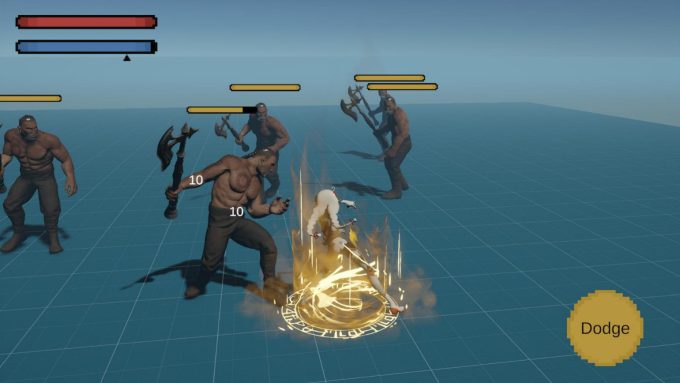
This is a combat design practice finished within one week.
The purpose of this design sample and demo is to build a basic action combat framework, providing an easy-to-learn action and friendly game experience for casual players. Specifically, it has:
- Low complexity (width) and probability space, which means fewer rules and elements.
- High active action frequency and low passive action frequency, to let the player take control of combat pacing.
- Resource design focuses on player behavior.
- AI and game mode design focuses on controllable combat intensity.
Three things came out of the week: the combat design document (PDF, 19 pages, 1.6 MB), a playable Windows build (ZIP, 66 MB) with a training ground and a combat challenge mode, and the gameplay video below. The demo is built in Unity, and the enemy decision-making runs on behavior trees. The document is reproduced in full after the video.
Contents
Core Mechanics
States and Transitions
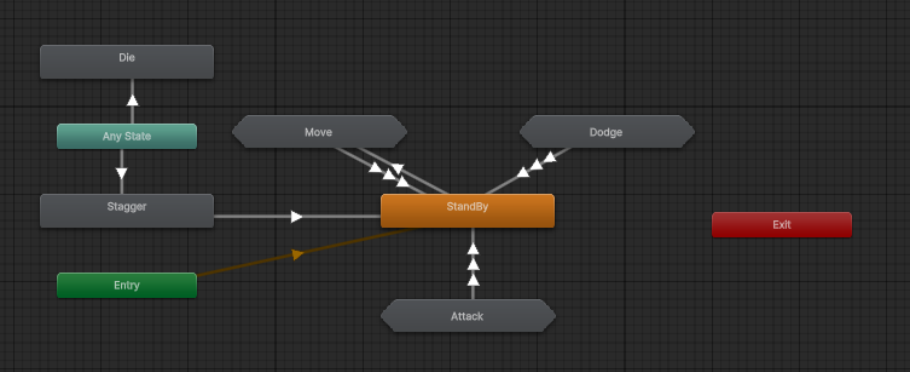
- Standby & Move – the default state, which can immediately transition to any other state.
- Dodge – can be entered immediately from the Standby & Move and Attack states.
- Attack – entered from the Standby & Move state, with different interrupt levels depending on the attack move.
- Stagger – entered immediately from any state when interrupted by an opponent’s attack, and exited when the animation ends.
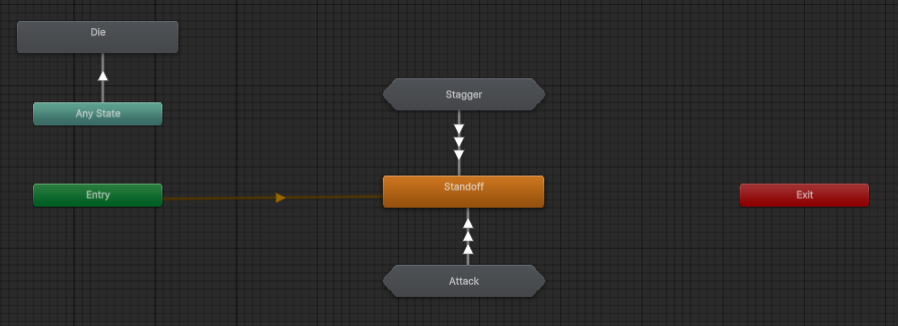
- Standoff – the enemy’s default state, which can immediately transition to the other states.
- Attack – entered from the Standoff state, with different interrupt levels depending on the attack move.
- Stagger – entered immediately from any state when interrupted by an opponent’s attack, and exited when the animation ends.
Interrupt and Anti-Interrupt Level
For both the player character and the enemy, when their attack interrupt level is higher than the opponent’s current anti-interrupt level, they will interrupt the opponent’s current state and make them stagger.
Skills and Moves
Player Character
- Normal attack. There are five combos of normal attacks, with both interrupt and anti-interrupt levels of 1.
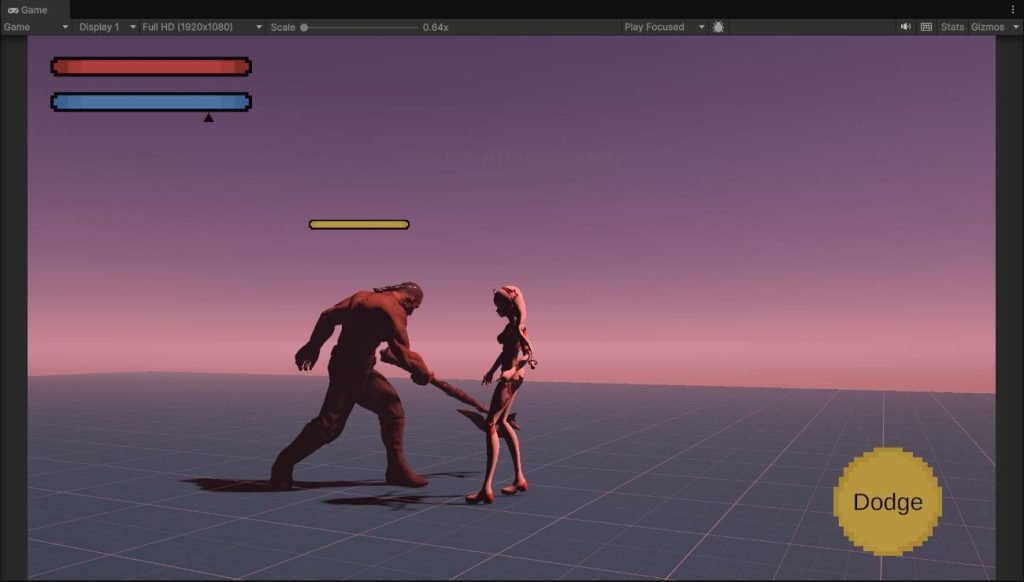
- Branch attack. A branch attack is available as the next combo after normal attack combo 2 (with sufficient energy). It causes a lot of damage, with both interrupt and anti-interrupt levels of 3.
- Dodge. The player is invulnerable while dodging and can flee from the threat with the movement.
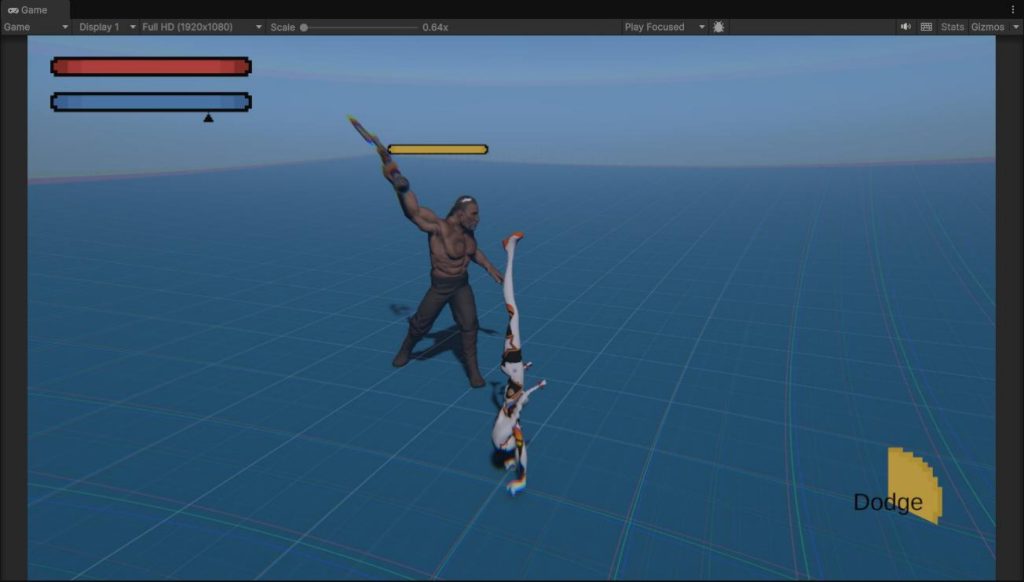
- Bullet time. When the player dodges while an enemy is attacking and the player is in the enemy’s attack range (in fact, the dodge detection range is larger than the attack range), the bullet time effect is triggered. During bullet time the player is invulnerable, all player attacks have an interrupt level of 3, and the enemy loses its target.
Enemy
- Normal attack. The normal attack causes less damage to the player, with an anti-interrupt level of 0 and an interrupt level of 1, but its anticipation is shorter than the heavy attacks.
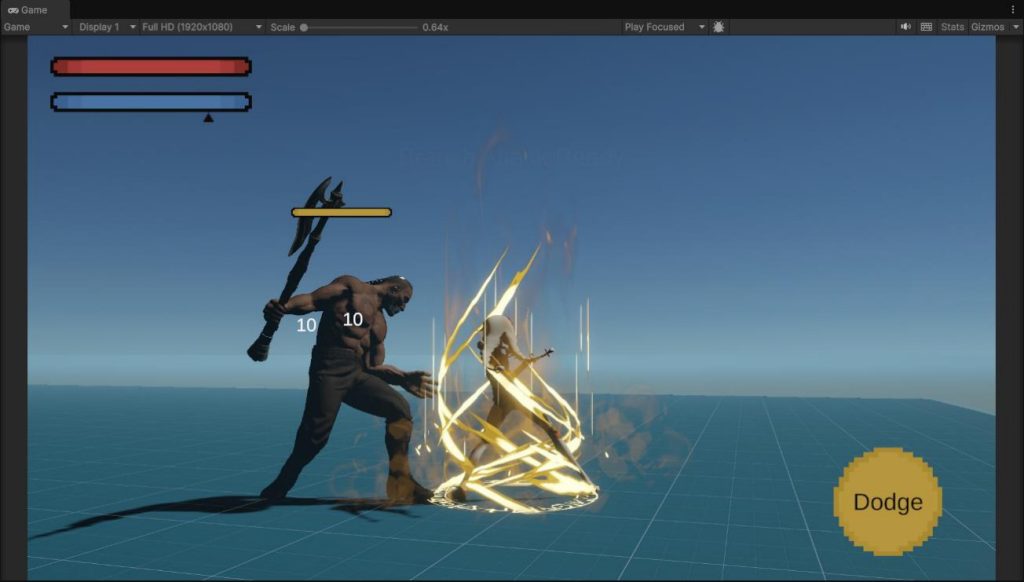
- Heavy attack. The heavy attack deals high damage to the player and has an anti-interrupt level and an interrupt level of 2, but it has a longer anticipation, with visual effects and sound effects as cues.
- Jump heavy attack. A special version of the heavy attack with the same stats as the regular one, but during the anticipation the enemy jumps to the player’s position, which means it can attack the player from far away.
- Angry counterattack. It has the same animation and stats as the heavy attack, but it is triggered by the anger mechanism: when the enemy accumulates a certain amount of anger, it immediately uses the heavy attack.
Combat Resources
Energy (player). Players can accumulate energy through normal attacks, and using branch attacks consumes energy.
Anger (enemy). Enemies accumulate anger when they take normal attacks from the player, and use the heavy attack immediately when they get a certain amount of anger. Anger also increases the chance for the enemy to choose a heavy attack when attacking, and it resets to 0 on the enemy’s next heavy attack.
Ideas and Thoughts on Core Mechanics Design
- According to the interrupt level set-up, the interrupt relationship for all moves is: player branch attack > enemy heavy attack > player normal attack > enemy normal attack > other states. This gives both the player and the enemy the opportunity to counter each other, but the player has an overall advantage in keeping control of the combat.
- The enemy’s angry counterattack can prevent the player from using normal attacks to suppress the enemy, bringing changes and risks to the combat.
- The player’s dodge can counter any enemy attack, including the normal attack and the heavy attack (including those triggered by the angry counterattack), so the player always has the opportunity to take control of the combat and take advantage.
- The accumulation of player energy is a positive feedback loop design, where the player has the opportunity to use branch attacks to cause higher damage after taking the risk of normal attacking the enemy. It can increase the combat intensity and keep the player excited.
- The accumulation of enemy anger is also triggered by the player’s normal attack, which is a negative feedback loop mechanism that serves as a balance and provides changes for the combat dynamics. However, it is a mechanism of the enemy, and the player will not feel the constraint directly. And the player can always use dodge as a countermeasure to take advantage.
- The accumulation of both resources is triggered by the player’s behaviors, so the player controls the combat pacing.
Controls and Effects
State Transitions
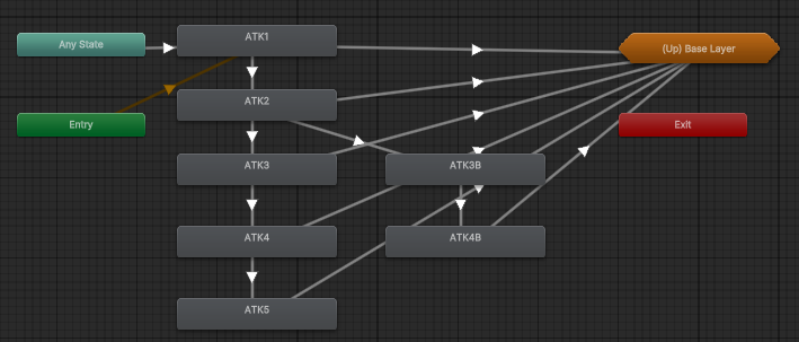
Attack Combo
Every player attack animation has four phases.
- Anticipation. Preparation before the attack takes effect.
- Contact. The attack takes effect, and opponents within the attack range will be damaged or interrupted.
- Combo ready. If there is a new attack instruction, it will immediately transition to the next attack combo.
- Recovery. If the player did not input an attack instruction for the next combo, or this is the final combo, the state transitions to Standby by default at this phase.
Combo input time window. The start time for accepting the next attack combo input is usually earlier than the combo ready phase, which allows the player to input the combo instruction earlier for a smooth and tolerant experience. Some call it input buffering.
Branch input time window. If the player inputs an attack instruction slightly later after the start of the combo ready phase in normal attack combo 2, the next combo becomes a branch attack. This way, a combo tree with a branch can be implemented with just one button as input.
Dodge
Players can immediately transition to dodge, except from the stagger and branch attack states. This reduces the decision risk for the players.
Why is dodge not available during the branch attack? Because the player is invulnerable with the branch attack, meaning there is no risk, and I don’t want the players to lose the opportunity to attack due to misoperation and subconscious reactions.
Other Transition Optimizations
Recovery phase of dodge and attack. During the transition from dodge and attack to standby, the recovery phase at the end of the animation can be interrupted by movement and new attack input, which makes the player feel smoother in control and more flexible in character actions. Strategically, it reduces the cost and risk of player behavior.
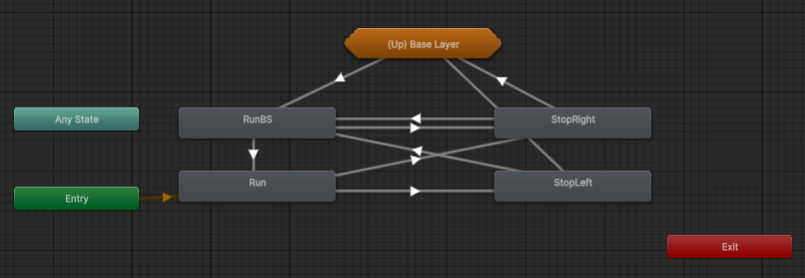
Different run-to-stop animations based on the timing and pose of running. When the player runs, the game tracks and updates the current pose through animation events and selects the proper run-to-stop animation for transitioning to standby.
Targeting System
Target selection. In the demo, I only implemented a simple strategy: selecting the nearest enemy within a certain distance as the target. However, I have more unimplemented strategies and designs, and I state them at the end of the document.
Character rotation recentering. When the player initiates an attack (combo 0), the game updates the target selection, and the player character rotates towards the target. I didn’t use the mechanism of “suck to target” because the attack animation had already moved the character forward.
Camera recentering. When the player initiates an attack (combo 0), the camera also smoothly rotates and points towards the target, but this only occurs when the camera direction is opposite to the direction to the target (more than 90 degrees), because I don’t want the game to override camera controls too frequently and make players uncomfortable.
Feedback on the Combat Dynamics
HUD
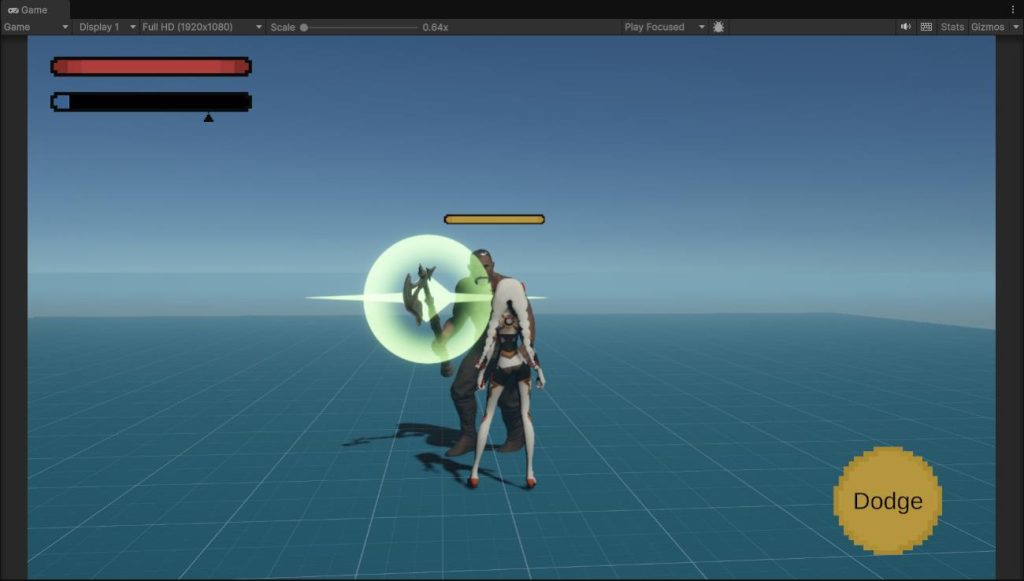
The player health bar, the player energy bar, the player dodge cooldown icon and the enemy health bar are the basic information that players need to assess the combat situation and make decisions.
Why not show the enemy anger bar? Because as I mentioned, the enemy’s angry counterattack can provide more variety and possibilities for combat, and I didn’t want the player to know in advance when the enemy will counterattack.
Player Attack Feedback
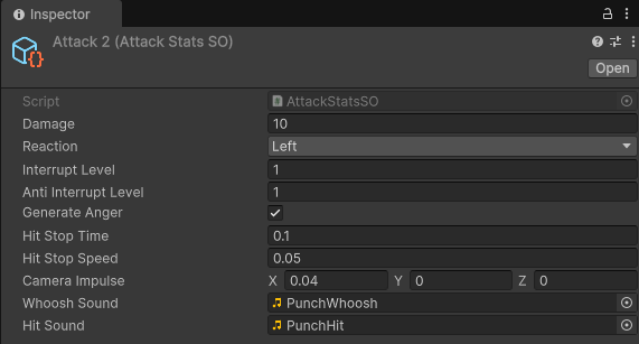
- Visual effects and sound effects. Visuals and sound effects are common ways to enhance the aesthetics of the action, and here I implemented not only the “whoosh” effect, but also the hit effect, so that the player knows if they have successfully hit the target.
- Hit stop. When the player character successfully hits an enemy, the animation slows down briefly to provide a sense of resistance from the impact.
- Camera shaking. Camera shaking in different directions and amplitude curves can provide feedback on the inertia and force of the impact.
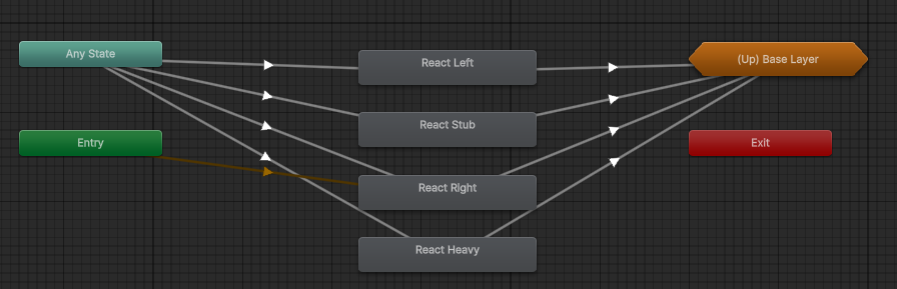
- Enemy reaction animation. The enemy reacts with different animations for different player attacks. It can also provide feedback on the inertia and force of the impact.
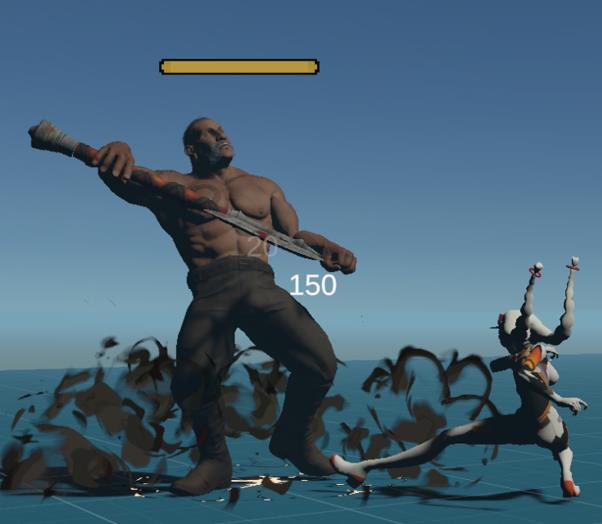
Damage indicator. When the player hits an enemy, a damage number is generated on the screen. Although this is not a simulation of physical reactions, it is still a confirmation of the player’s action and feedback on high-level cognition.
Combat Information Accessibility Enhancement
Post-processing effect on the player receiving an attack. When the player gets attacked, the screen briefly turns red to warn the player and remind them to pay attention to their health.
Post-processing effect on entering bullet time. In addition to slowing down enemy animations, the player can also recognize bullet time through a special post-processing effect, and decide to counterattack or flee from danger.
Branch attack input time window cue. When the player has enough energy to use the branch attack, there are visual and sound effects as cues in the branch attack input time window of normal attack combo 2.
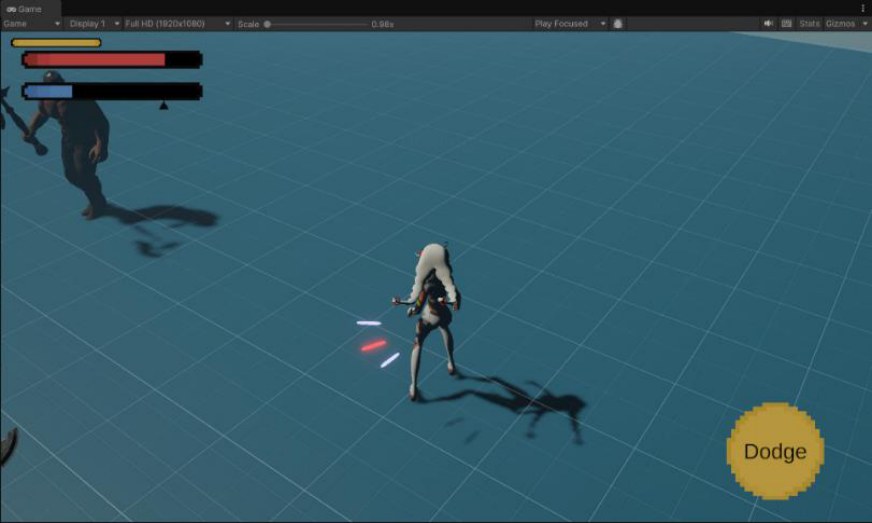
Off-screen threat indicator. When an enemy is outside the screen, players can know the enemy’s location and possible upcoming attacks through threat indicators around the character, and react in time.
Enemy heavy attack cue. In the anticipation phase of an enemy heavy attack, there are visual and sound effects as cues for the player to make timely responses.
Ideas and Thoughts on Controls and Effects Design
In addition to combat aesthetics, I am more concerned about how the design of the above aspects serves my design goal: providing an easy-to-learn action and friendly game experience for casual players. Therefore, my design is committed to achieving the following goals:
- High accessibility of combat information. Provide as many ways as possible to convey key combat information to players, such as upcoming threats and advantageous or disadvantageous situations.
- High input tolerance. Expand the input window so that players can easily do the actions they want.
- Low decision risk and cost. The player’s behavior and actions come at a cost, such as being attacked when executing incorrect actions or during the recovery phase of actions. Transitioning early and immediately to another state (like dodge) can reduce that cost.
AI Design
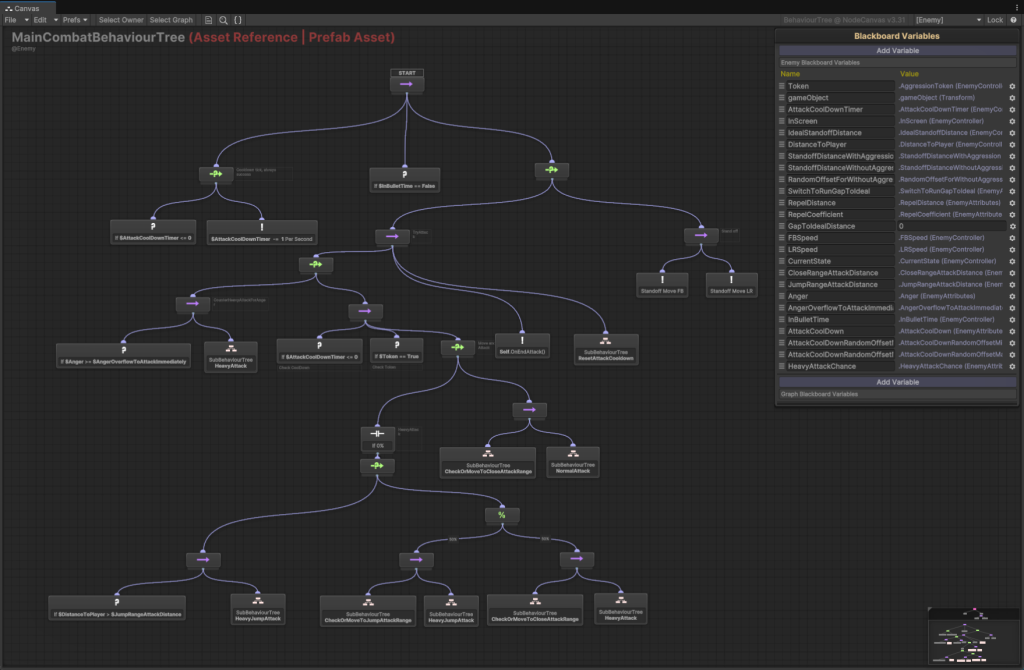
In my demo, I mainly use behavior trees for enemy decision-making. There are too many sub behavior trees to show them all here, so the enemy’s behavior is described in natural human language below.
Individual Behaviors
Attack Permission
Enemies in the standoff state are always eager to attack, but they must meet two conditions to attack:
- No attack cooldown. Each enemy has its own attack cooldown. This mechanic is designed to prevent an enemy from attacking continuously.
- Acquire a token from the enemy manager. I’ll explain it later.
Attack Decisions
Normal attack or heavy attack. When enemies are allowed to attack, they have the chance to use either a normal attack or a heavy attack. The choice is based on probability: the probability of choosing a heavy attack = base probability + current anger.
Heavy attack or jump heavy attack. When an enemy chooses a heavy attack, it has the possibility to use a regular heavy attack or a jump heavy attack, depending on the enemy’s current distance from the player. The farther away from the player, the more likely it is to choose the jump heavy attack.
Group Behaviors
Aggression Token System
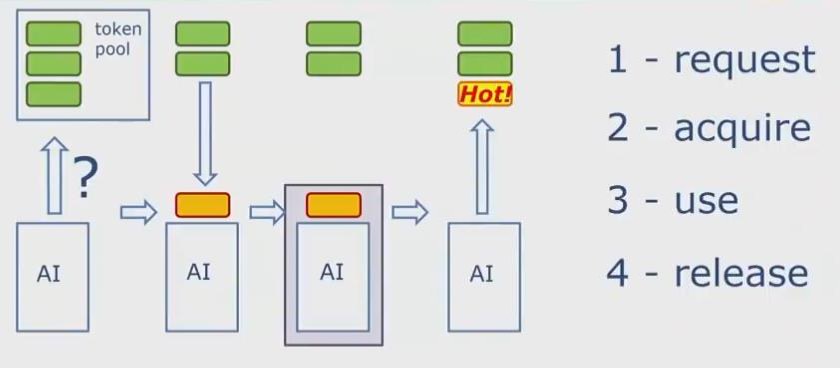
As I mentioned, the enemy needs a token to attack. It acquires a token from the enemy manager, uses it during the attack, and then releases and returns it. This is a centralized system driven by the enemy manager and a unique token pool.
Hot token. A newly released token is not available immediately; it needs to wait for a cooldown before it can be granted to another enemy.
Priority on granting tokens. When choosing which enemy to grant the token to, the enemy manager considers the following conditions of the enemy, in order:
- Whether they are on screen.
- Whether they are on attack cooldown.
- Whether they are in stagger.
Steering Behaviors in Standoff
Longitudinal speed control. Because the enemy is always facing the player, its longitudinal movement changes the distance to the player. There are two ideal distances: the aggressive distance (when the enemy has a token but has not yet attacked) and the non-aggressive distance (when the enemy does not have a token); the former is smaller than the latter. The enemy constantly adjusts its longitudinal speed to reach the ideal distance, and the farther away it is, the faster it moves.
Lateral speed control: collision avoidance (force-based). Enemy lateral movement is mainly to prevent multiple enemies from congregating in the same position, or occluding each other. Here, the enemy moves away from the nearest enemy by adjusting the lateral speed. Because the player’s field of view is a cone area, the closer the enemy is to the player, the smaller the enemy’s perception range. (This is a combat design document, so I won’t discuss my algorithm specifically.)
Ideas and Thoughts on AI Design
My AI design serves two goals:
- Decision-making focused on player behavior. Enemy movements are based on the player’s position. When an enemy decides which attack to use, it also considers the current anger generated by the player’s previous normal attacks, and the player’s position.
- Controllable combat intensity. The size of the token pool and the cooldown time of the hot token determine the global combat intensity, that is, the frequency of enemy attacks and the number of aggressive enemies.
Game Mode Design
Wave-Based Enemy Spawn Strategy
In encounter design, we want the player to engage in a longer combat, but spawning all enemies at once can make the level too crowded and get the combat intensity out of control. With the configuration of different waves, we can control the number of enemies in the level and the combat intensity.
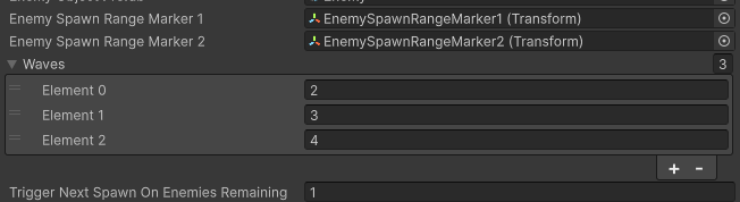
Trigger next spawn on enemies remaining. We don’t have to wait until all the enemies are destroyed to spawn the next wave. We can spawn new enemies when there are only a few enemies left in the level, to maintain the combat intensity.
Unimplemented Improvements and Future Designs
More Intelligent Target Selection
- Select the enemy within a certain angle as the target, based on the direction of the current movement input.
- Leave the target selection unchanged after dodging or stagger, for the player to counterattack.
More Combat Camera Designs
- During combat, the “look at point” shifts towards the enemy, letting the player pay more attention to the enemy’s actions.
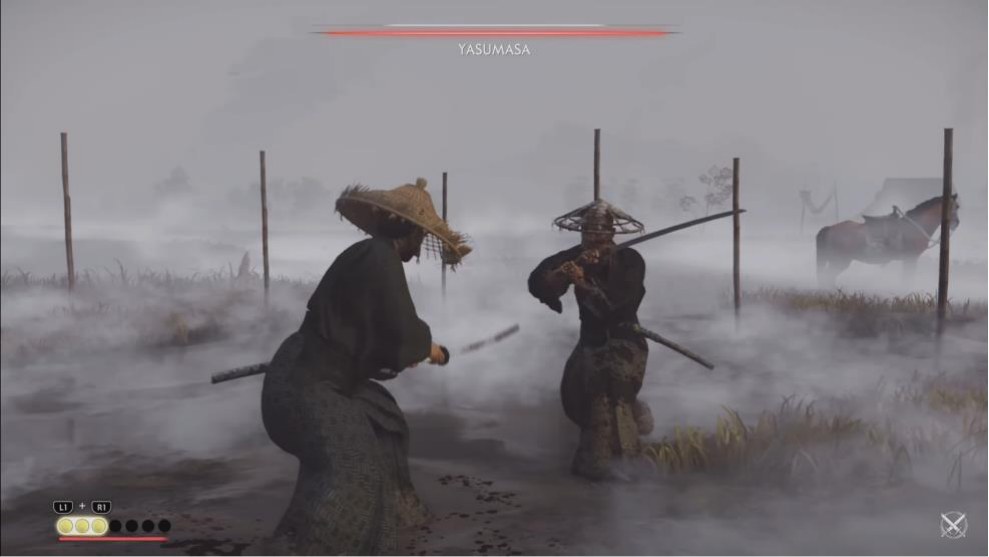
- When the player fights a single enemy, the camera uses a smaller distance to the player (radius) and an appropriate horizontal (shoulder) offset, making it easier for the player to perceive the position and action details of the enemy and himself.
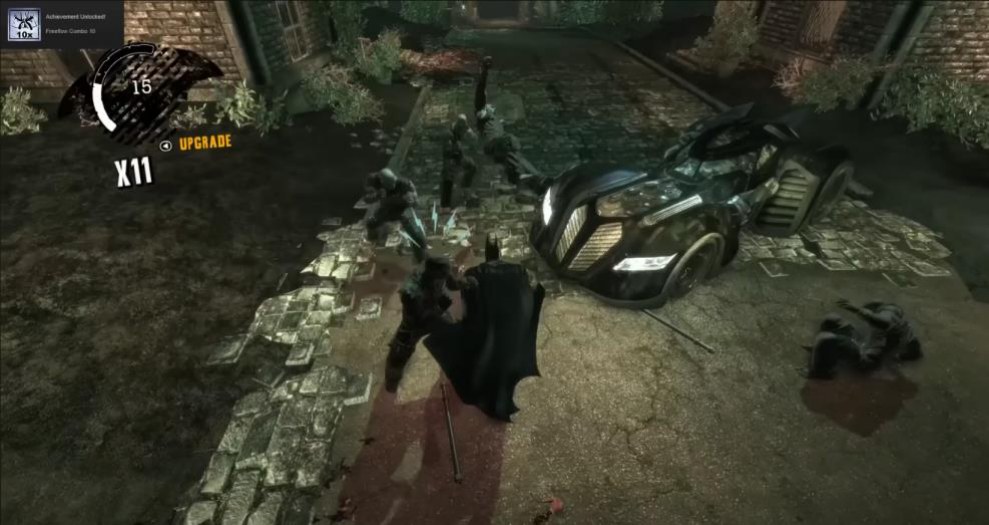
- When the player is fighting more enemies, the camera uses a larger distance and an appropriate top-down angle, to make it easier for the player to see more enemies.
Movement Ability
The player can hook and dash to the enemy, and one of the keys to designing this mechanic is to implement an aiming and targeting mechanic that is tolerant of precision.
More Enemy Archetypes
- Ranged enemies. They can create threats from far away and force the player to move around the level to eliminate them.
- Multiple-tier enemies. A mix of elite and normal enemies, and even enemies with different styles and stats, will force the player to fight with more thought and strategy.
Online Resources Used
- Enemy model and animations: Mixamo
- Visual effects: Unity Asset Store, author Kyeoms
- Sound effects: Unity Asset Store, Punch and Fighting Sounds
- UI images: OpenGameArt
- Behavior tree tool: NodeCanvas
The original document: Combat Design Document (PDF, 19 pages, 1.6 MB). The playable demo: Windows build (ZIP, 66 MB).
The two camera reference images are screenshots of published games, and the token lifecycle diagram comes from another source. All three are used as references only. The demo, its design and all the other figures are my own work.