Horde-extension: notifications and OpenProject issues for Epic’s Horde

Horde-extension is a pair of plugins for Epic’s Horde build server. One is a notifier: when a job or a preflight finishes, or CI breaks, it tells the people involved by Mattermost DM and email, and keeps a build-status channel up to date. The other is an OpenProject integration that replaces Horde’s built-in Jira one: a build issue on the Horde dashboard can be turned into an OpenProject work package, and the work package’s status and assignee sync back to the Horde issue. Both are DLLs mounted into the stock Horde container, and the notifier has a small Python sidecar in a container of its own. The stock image is untouched and Horde isn’t forked, though one stock DLL and the dashboard are patched at build time.
It’s on GitHub: YexiangZHOU/Horde-extension. It installs on top of Indie studio infra stack, which has an article of its own; apply.sh checks that the base stack has been applied to the host first and won’t run otherwise.
Contents
Why it exists
Horde’s only built-in notification channel is Slack, and it stays off until you set a SlackToken. There is no email support; the source has no SMTP code at all. So by default, when CI breaks, nobody hears about it. Horde opens a build-health issue and works out which changelists are suspects, but you have to go to the dashboard to see any of that. We use Mattermost, and the Slack sink can’t be adapted to it: it’s written against Slack’s Web API and Socket Mode, and Mattermost’s API is different.
Issue tracking is a similar situation. Horde ships a Jira integration. From a build issue on the dashboard you can open a Jira ticket, the ticket’s status shows back on Horde, and whoever gets the ticket in Jira becomes the owner of the Horde issue. It’s a useful feature, but it only supports Jira, and whether it’s on is decided in compiled code by whether JiraUrl is set. We use OpenProject.
What you get once it’s installed
The notifications work like this. When you run a job by hand, or a preflight, you get a Mattermost DM and an email when it finishes, with the result: succeeded, had warnings, failed at which step, or aborted and by whom, plus a link to the job.
When CI breaks, the notification goes to the people who submitted the suspect changelists. Horde already computes the suspects; the notifier uses its list. The message says roughly “your CL may have broken such-and-such in this stream”, followed by an excerpt of the failure log, capped in length, with a link to the full log. A passing CI run doesn’t DM anyone, or you’d get a message for every green build.
There’s also a #build-health channel the whole team can see. A passing CI run posts a one-line green status there, with no mentions. A break opens a thread, one per issue; later updates edit the original post instead of adding new ones, and when the issue resolves the post is struck through. Whether the thread @-mentions the suspects depends on a few conditions: the issue has to be promoted (or the failing node annotated to notify submitters), the severity has to be one you’ve enabled, and the number of suspects has to be under a cap. Over the cap, the post gives a changelist range and a count with no names. The owner isn’t subject to the cap; if the issue has one, they’re mentioned. Suspects who have declined the issue, and service accounts, are dropped before any of this.
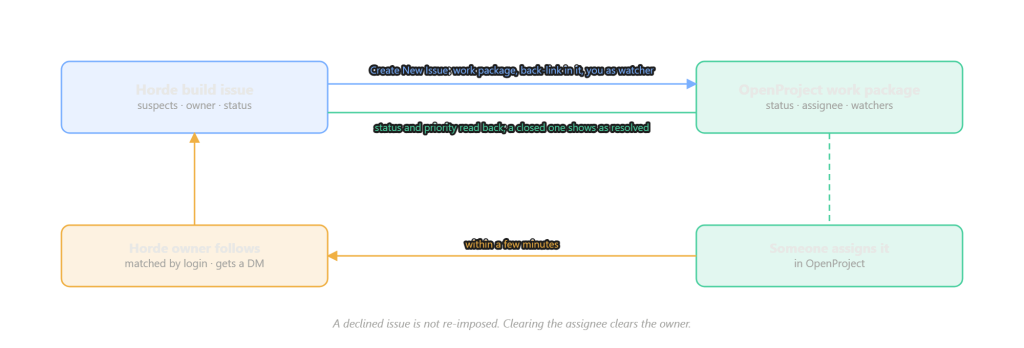
On the OpenProject side, a build issue on the dashboard gets a Create New Issue button. Pick a project, a category and a type, write a summary, submit. Horde creates a work package in OpenProject, attaches it to the build issue, writes a link back to Horde into the work package’s description, and adds you as a watcher. After that the work package’s status and priority show on the Horde issue, and when the work package is closed the build issue shows as resolved. If a work package already exists, Link Issue takes its numeric id or its URL.
Ownership syncs in the other direction. Assign the work package to someone in OpenProject and, a few minutes later, that person becomes the owner of the Horde issue and gets a DM. The match is by login, not email, so the person needs a Horde account; anyone who has submitted code has one. Two details: if the person had already declined the issue on the Horde side, the sync doesn’t reassign it to them; and clearing the assignee on the work package clears the owner on Horde.
How the notifier works
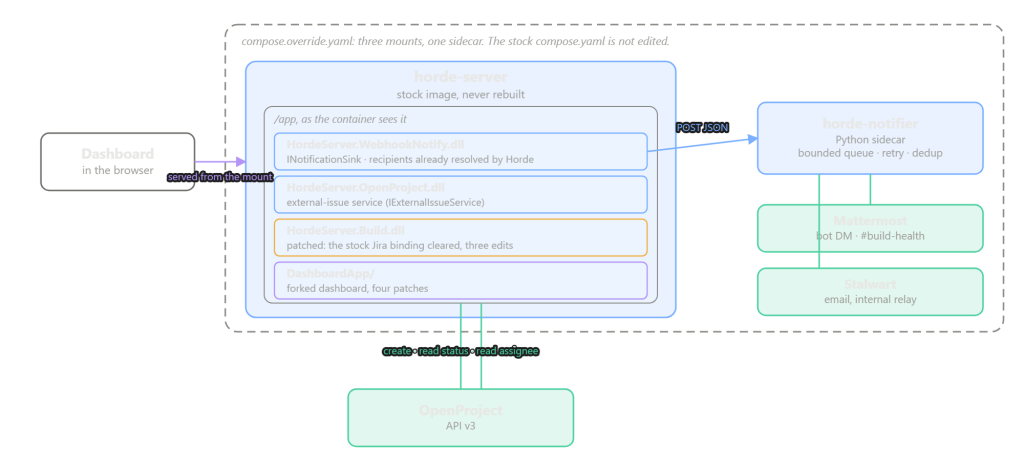
When Horde starts it scans /app for HordeServer.*.dll and loads any class marked [Plugin]. So a DLL mounted into the container becomes part of the server, with no change to the image.
Our DLL registers an INotificationSink. Horde keeps a list of sinks and calls all of them for each event, so the Slack sink is still there and ours sits alongside it. The important point is that by the time Horde calls a sink, the recipients are already worked out. Who subscribes to the stream, whether the initiator gets added on the first failure, whether a preflight notifies only its author, whether the outcome counts as a warning or a failure: that’s all Horde’s logic, and we don’t rewrite any of it. Polling /api/v1/jobs and inferring state changes ourselves would have meant reimplementing all of it, and getting edge cases wrong.
The sink itself is small. It packs the event, recipients, job or issue, outcome and link into a JSON payload, POSTs it to a sidecar with a timeout of a few seconds, and swallows any exception. It doesn’t buffer and doesn’t retry. That’s because it runs inside Horde’s NotificationService, and if it blocks, other notifications block with it.
The actual sending is done by horde-notifier, a small Python service in its own container on the same Docker network as Horde. It puts each POST on a bounded in-memory queue and returns immediately; a worker takes items off the queue and handles them: build the message, send a Mattermost DM through a bot account, send email through Stalwart’s internal relay, retry with backoff on failure, and dedupe by job and recipient. If the queue is full it drops the item and logs it. If the container restarts, whatever was queued is lost, and an unresolved issue may get a second thread in the channel. We didn’t add a database or an outbox; the queue plus retries is enough, and the cost of going further isn’t worth it.
Sending lives in the sidecar and not in the DLL mainly so it can be changed easily. Message wording is what changes most often, and any change inside the horde-server container needs --force-recreate: the dashboard drops, running jobs are affected, agents reconnect. The sidecar can be edited and restarted on its own without Horde noticing.
Why the OpenProject side is more work
Horde has an IExternalIssueService interface with four methods: create an issue, read back status for some keys, list projects, and return a URL for a key. The dashboard’s create modal, its dropdowns and its status column all go through three REST endpoints to that interface, and none of them care whether Jira is behind it. Implementing the interface against OpenProject’s v3 API is not much work.
The difficulty is that Horde allows exactly one such service, and the choice is made in stock code: JiraService if JiraUrl is set, otherwise a no-op whose create method throws. It isn’t a list you can add to. We tried registering our own implementation from a plugin to override it, and it didn’t work, because plugin ConfigureServices runs in load order and the stock registration comes last.
So HordeServer.Build.dll gets patched. A small tool written with Mono.Cecil reads the stock DLL and changes three things: the two AddSingleton<IExternalIssueService, …> calls become nop; the "Jira" string the dashboard branding uses becomes "OpenProject"; and the three config properties JiraUrl, JiraUsername and JiraApiToken are renamed to OpenProject*. Each change checks how many sites it matched, which must be exactly 2, 1 and 3; if any count is off the tool exits with an error and writes nothing. That way, if a Horde upgrade changes that code, it shows up at build time. The patched DLL has no default implementation left in it, so it has to be mounted together with our OpenProject plugin; without the plugin the server fails at startup.
The dashboard needs separate treatment. It’s the front end, so the server patch doesn’t reach it, and two places in it are written for Jira specifically: Link Issue rejects numeric ids, and View Issue builds links in Jira’s /browse/<key> format, which 404s against OpenProject. This part is four patches on the stock dashboard source, fixing those two things and swapping the Jira wording for OpenProject’s. Before patching, a script counts 29 markers in the source, and the counts have to match the Horde version we’ve pinned; if they don’t, upstream changed the code and you read the source first instead of adjusting the numbers. The built dashboard is mounted into the container as a whole directory, replacing the stock one.
Deploying
Everything the deployment needs is in one file, deploy/.env: where the base stack’s stack/horde/ directory is, the OpenProject URL and API token, the Mattermost bot token, the mail relay address, and the stream and template ids to check. Then:
./deploy/apply.sh          # preview: compare every file we manage against the host, change nothing
./deploy/apply.sh --write  # back up, ship, rebuild the image, recreate the containers
./deploy/verify.sh         # check that it took
./deploy/check.sh          # check the repository itself; no host needed
What apply.sh sends to the host is a compose.override.yaml next to the stock compose.yaml, which Docker Compose merges automatically. The override mounts the three DLLs and the dashboard directory into horde-server, passes the sink the notifier’s address and the plugin its OpenProject config, and adds the notifier sidecar. The stock compose file isn’t touched, and image: still points at the stock image, so docker pull updates work as before.
apply.sh only writes files this project manages; it doesn’t edit Horde’s configuration. Two settings the project depends on have to be made by you, in the stream config: promoteIssuesByDefault: true on each CI template, and a schedule on the template that runs on a timer. Without the first, a build break produces no notification and no error either. verify.sh checks both and reports clearly if they’re missing.
check.sh checks the repository, not a host. It parses every shell script, runs the notifier’s unit tests, validates the spec files, and scans everything git archive would package for any value declared in deploy/.env appearing as a literal.
What a Horde upgrade involves
The plugins use Horde’s internal interfaces, which Epic can change at any time. So after a Horde upgrade you recompile the DLLs, re-run the patch tool (a failed count check means the code moved), re-apply the four dashboard patches (a patch that doesn’t apply means upstream changed a line we depend on, and needs a manual look), then apply and run a smoke test. The full procedure is in docs/horde-upgrade-playbook.md. It’s the fixed cost of the plugin approach, and much less than maintaining a fork of Horde.
What isn’t done
There’s no “job started” notification; the sink interface has no hook for it, and the event isn’t very useful anyway. Mattermost messages have no claim or resolve buttons; that would need two-way communication and stored state, and the current design is one-way. A build break doesn’t create a work package automatically; creation is a click on the dashboard, same as stock Horde, and only the sync afterwards is automatic. The notifier doesn’t persist anything, as mentioned above.
Where to start
The repository: YexiangZHOU/Horde-extension. docs/horde-notifier-design.md explains the design, docs/horde-openproject-usage.md is the guide for team members, and section 0 of docs/horde-openproject-deploy.md is the deployment procedure from scratch, including the build.
The base stack it depends on: YexiangZHOU/Indie-studio-infra-stack, which has an article of its own.