Indie studio infra stack: self-hosted infrastructure for a small Unreal team

Indie studio infra stack is a self-hosted infrastructure stack for small Unreal teams: sixteen services on one host under one domain, including Perforce, Helix Swarm, Horde, GitLab, Mattermost, Outline, OpenProject, mail and a VPN, and you sign in to all of them with one authentik account. The whole deployment is one directory tree. You fill in your studio’s name, domain and subnets in studio.env, the scripts render every configuration file from it, and you bring the services up in the documented order.
It’s on GitHub: YexiangZHOU/Indie-studio-infra-stack. This post covers why it’s built the way it is, what’s in it, and how to make it yours. The Horde extension, which adds notifications and issue tracking to the build farm, has an article of its own, and so does SubmitTool.
Contents
Why self-host all of it
Unreal studios never really had the option of going all-SaaS. The content is huge and binary, so it lives in Perforce. If you want UnrealGameSync to show people which changelist is safe to sync, or a build farm that knows what an Unreal target is, that’s Horde, and Epic only ships Horde as something you host yourself. So somewhere very early, before there’s much of a game to speak of, somebody sets up a Linux box.
Then everything else goes to SaaS anyway. Chat is Slack or Discord, tasks are in Jira or Notion or a spreadsheet someone made in a hurry, the wiki is wherever, mail is Google. Everyone ends up with five or six accounts, the studio pays several per-seat bills, and the data is spread across vendors that have nothing to do with the server.
We didn’t want that, so we built this. The main reason is the login. Someone new starts and you make one account in authentik. They go to the VPN portal and issue themselves a WireGuard peer, then open the root domain and land on a page with every tool on it. The first time they p4 login, Perforce creates their user (it’s bound to authentik over LDAP, with userautocreate on). UGS logs them in through Horde. Swarm, GitLab, Mattermost, Outline, OpenProject, mail: same account every time. When they leave, you disable that one account.
The second reason is that everything stays on your hardware. Source, art, builds, design docs, chat logs and mail all sit on a machine you own, under a domain you own. Admin login only works from the office LAN, and remote access is a VPN you run.
The third reason, and the one I care about most, is that the whole thing is reproducible. The directory you clone or unpack is the deployment. There’s no copying configs onto the server, so git status on the host tells you what somebody hand-edited. Everything specific to your studio is in one file. The identity provider’s config is checked-in source. There’s also a verify.sh that asks the running system whether it still matches what the tree says.
What’s in it
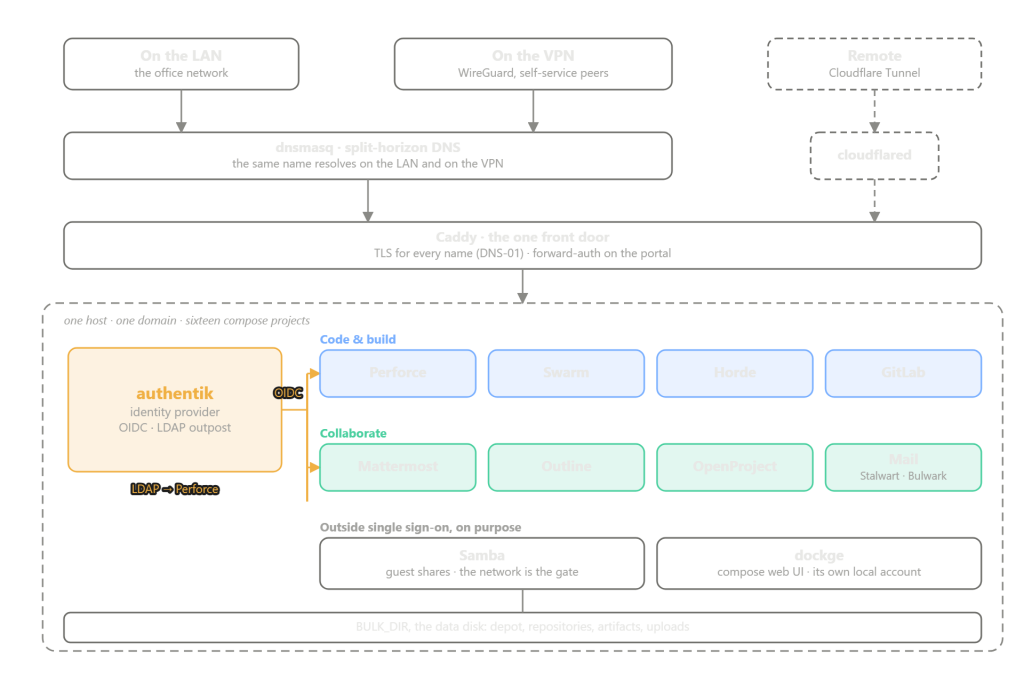
There are sixteen compose projects under stack/, plus a portal page that Caddy serves at the root of the domain.
| Service | What it is | How you sign in |
|---|---|---|
| authentik | the identity provider | it is the sign-in |
| Caddy | reverse proxy, TLS for every name | none |
| dnsmasq | split-horizon DNS | none |
| cloudflared | remote entry over Cloudflare Tunnel | none |
| wg-portal | WireGuard VPN, self-service peers | OIDC |
| Mattermost | chat | OIDC |
| Outline | wiki | OIDC |
| OpenProject | projects and issues | OIDC |
| GitLab | Git hosting and merge requests | OIDC |
| Perforce (Helix Core) | version control for the game itself | LDAP, against authentik’s outpost |
| Helix Swarm | Perforce code review | your Perforce credentials, passed through |
| Horde | Unreal build farm and CI | OIDC |
| Stalwart | mail server | OIDC |
| Bulwark | webmail | OAuth against authentik |
| Samba | file shares | guest; the network is the gate |
| dockge | web UI over the compose projects | its own local account |
| the portal | the page you land on | forward-auth |
A few of those sit outside single sign-on on purpose. Samba is out because SMB wants an NT password hash, which an OIDC provider doesn’t have and won’t generate, so hooking it up would mean running a second password store. The shares are guest instead, and the network is the gate: LAN and VPN can reach them, and the VPN is controlled by authentik anyway. dockge is a web UI over every container on the box, so its login is a login to everything. It has its own account, and you decide which network it’s reachable from. Stalwart keeps one local admin that the cert-sync sidecar uses to install renewed certificates. The comment in its compose file says what that account bypasses and why it’s still there.
dnsmasq gives every name two records, one for the LAN and one for the VPN, so chat.example.com resolves to something you can reach from either network and there’s no separate VPN address to remember.
The Unreal part
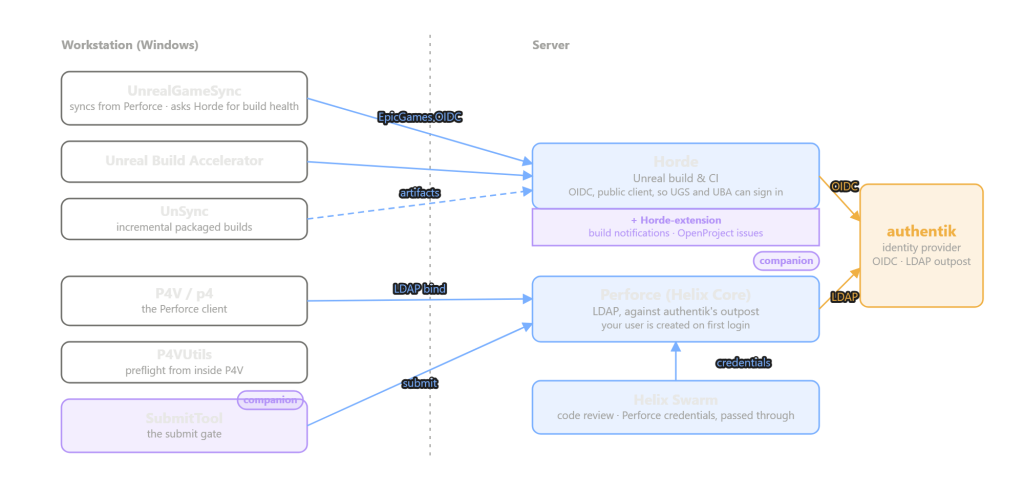
Perforce authenticates against authentik’s LDAP outpost, and the first successful bind creates the user, so nobody has to be given a Perforce password. Swarm has no login of its own. It passes your Perforce credentials through.
Horde is an OIDC client, and specifically a public one. UnrealGameSync and Unreal Build Accelerator sign in through Epic’s OIDC library, which runs on the developer’s machine and finishes the exchange on localhost, so a client secret would ship with the tools to every workstation and wouldn’t stay secret. Horde’s provider is public for that reason. It relies on PKCE plus the redirect URI check, and it gets offline_access so UGS has a refresh token and doesn’t ask you to sign in again several times a day. The dashboard uses the same client, because Horde only has one.
UGS’s ApiUrl points at horde.example.com/ugs. That line is what makes UGS show build health and CIS badges. Without it, UGS still syncs and still builds, and just looks like the CI server is down.
The workstation side is documented too, in client/README.md: the Perforce connection, the handful of per-machine settings, UGS’s team-wide config (which lives in the depot, next to the engine it configures), P4VUtils, SubmitTool, UnSync. It’s documentation only, and the README explains why it ships no files.
The two purple bits in the diagram are companions to the stack, each with its own article. Horde has no mail path, and its built-in notification sink only speaks Slack. The Horde extension adds Mattermost and mail notifications, plus two-way OpenProject issues from the Horde dashboard. It installs into this stack’s tree, but the stack doesn’t depend on it. SubmitTool is Epic’s validating submit gate, and putting it in front of this Perforce is covered in the SubmitTool article.
Making it yours
Everything that would be different at your studio from ours goes in one file. Secrets don’t go here (they’re generated separately), just names, addresses, paths and versions:
STUDIO_NAME="Example Studio"
STUDIO_SLUG=example
BASE_DOMAIN=example.com

UE_PROJECT=Lyra
UE_PROJECT_PATH=Lyra/Lyra.uproject
UE_GAME_TARGET=LyraGame
UE_EDITOR_TARGET=LyraEditor

VM_IP=192.168.1.10
VM_SUBNET=192.168.1.0/24
VPN_SUBNET=10.11.12.0/24
BULK_DIR=/mnt/bulk

[email protected]
ENABLE_CAPTCHA=yes
ENABLE_SMTP_RELAY=no
Every line in the real file has a comment saying where the value gets used. The install then looks roughly like this:
$EDITOR studio.env        # say who you are
./bootstrap.sh            # prepare the host
./apply.sh                # render every template from the declaration
./gen-secrets.sh          # mint credentials into per-service .env files
$EDITOR stack/*/.env      # fill the [ext] slots, the few values only you have
./apply.sh                # render again, now that the secrets exist
docker compose up -d      # per service, in the documented order
./seed-all.sh             # put the state inside the services where it belongs
./verify.sh               # does the running system match the tree?
The full list in docs/02-install.md is longer. Two services get held back from the first up, the seeds run twice, and the last step is revoking the bootstrap token. But that’s the general shape, and no step in it is editing a config file on the host by hand.
The [ext] slots are the values gen-secrets.sh can’t invent because they come from outside: your Cloudflare API token, the tunnel token, Turnstile keys if you turned the captcha on. The script tells you which ones are still empty, and any template that needs one refuses to render until it’s filled, so you never get a config with a blank where a token should be.
Design decisions to know about
authentik’s configuration is checked into the repository as source. authentik has an export command that looks like it solves this, but the export keys every object by primary key, and primary-key references don’t survive being replayed on a different instance. So the providers, apps, flows, policies and scope mappings are hand-written blueprints with natural keys. A fresh authentik reads them and builds the same identity layer on your domain.
Secrets never go into the repository. studio.env has no credentials. gen-secrets.sh writes them into per-service .env files that are gitignored, and a pre-commit hook with ten rules refuses credentials, rendered files, and anything shaped like a secret. The hook checks the value, whatever the key is called.
There are a few pieces of login hardening, all of the kind a small team can keep running. Superusers can only sign in from the LAN subnet. That’s a policy in the auth flow, with the subnet baked in at render time, so there’s no “unconfigured” state that fails open. MFA is zone-based: humans get enrolment forced on them, but the LDAP binds Perforce makes are exempt, so p4 login doesn’t get pushed into a TOTP prompt. Password recovery goes to the personal address on file. The Turnstile captcha on the login flow is optional, and the flow works without it.
verify.sh is read-only, and most of its checks are delegated to other scripts. It asks apply.sh --check whether the rendered files still match and seed-all.sh --check whether the state inside the services still matches, then checks the one thing nothing else can: that each Docker network landed on the subnet the declaration gave it. Two of those subnets are trust anchors, one exempting LDAP from MFA and one letting internal services relay mail unauthenticated. If either lands somewhere else there’s no error, and the two exemptions stop applying.
Releases ship a MANIFEST with a SHA-256 per file, since an unpacked release has no git. verify.sh compares it to disk, and apply.sh won’t render from a tree whose manifest lists a template that isn’t there.
Adding things, removing things
Adding a service has a fixed shape, because every existing service has the same shape. You add a new directory under stack/ with a compose file and an .env.tmpl; a provider and an application in the authentik blueprints; a site block in the Caddyfile; two records in dnsmasq’s hosts template, one per network; a tile on the portal; and its port, image and network in studio.env. If it keeps state inside itself that a mounted file can’t express, it also gets a seed/. docs/10-services/standalone.md lists all eleven kinds of file a service touches, and what breaks silently if you miss one.
One choice you have to make yourself is which claim the new service identifies people by. It isn’t uniform here: Perforce and Swarm know you by username, wg-portal and GitLab by preferred_username, Stalwart and Outline by email. That choice decides whether renaming someone later is a non-event or a mess, and there’s a table in the ops docs listing which claim each existing service uses.
Removing one is the same list backwards, and the same page walks through it, including the traps (there’s a service whose DNS record isn’t named after it, and grepping for the service name finds a comment). The services are more coupled than the table above suggests, and that page exists so you know what you’ll touch before you start.
The third way to extend it is what the Horde extension does: a separate repo that installs into this tree. It adds an env fragment under a service’s .env.d/, a compose.override.yaml, plugin DLLs and its own sidecar. Those are the only files it owns, and nothing here depends on them. If you want to add something to Horde, or to anything else here, without forking the whole tree, that’s the pattern to follow.
Who it’s for
The intended user is a small team where the person doing infrastructure is also shipping the game. The team uses Unreal, keeps the code and content in Perforce, wants Horde and UGS, and can keep one Linux box with Docker and a data disk running.
You’ll also need a Cloudflare account. The certificates need a DNS zone there, because Caddy does DNS-01 and that’s the only ACME challenge that works when the internet can’t reach your host. That half could move to another DNS provider with a different Caddy image and a different token. The tunnel, for anyone coming in from outside the LAN or the VPN, has no substitute in the tree as it stands.
It’s designed as one whole. Individual services can be removed, and the docs say how, but even if you only want one of them you still go through most of the install order first.
Where to start
The repository. Read docs/00-what-this-is.md, then 01-prerequisites.md, then 02-install.md. The prerequisites are worth reading carefully: some of the things on that list don’t fail right away when they’re missing, and only show up months later.
The Horde extension lives at YexiangZHOU/Horde-extension and has an article of its own.